
Treating GenAI as a core operational expense is no longer an option—it’s a necessity. We've moved past the point of shaving pennies off an experimental budget. Now, it's all about strategic oversight.
You need a disciplined framework to turn this powerful technology from a potential cash drain into a serious driver of profitability. The end game? Structurally lower your business costs in labor and operations, ensuring every dollar spent on AI delivers a clear, measurable return.
Why GenAI Cost Optimization Is Now Mission-Critical
Remember the early days of GenAI? The excitement was palpable, and businesses launched broad, unguided pilots left and right. Teams were told to just "experiment," which often meant defaulting to the most powerful—and most expensive—frontier models for even the simplest tasks.
Practical Example
A common scenario involves a marketing team using a premium, high-cost model to generate dozens of basic social media captions. This is a task easily handled by a much cheaper, smaller model, but without proper guidance, the team defaults to the most powerful tool available, inflating costs unnecessarily.
That "figure it out later" approach was fine when GenAI was a tiny line item. But the market has shifted, and fast. Enterprise spending on GenAI is set to explode from $11.5 billion in 2024 to a staggering $37 billion in 2025. That's a 3.2x jump in a single year. You can dig deeper into these spending trends over at Cmarix's software market analysis.
This kind of rapid scaling forces every leader to get serious about the unit economics of their AI initiatives.
The Shift from Experimentation to Economic Reality
GenAI costs are no longer buried in vague "innovation" budgets. They're now significant, recurring operational expenses showing up directly on the P&L. This new reality demands a whole new level of financial rigor. B2B leaders have to treat AI spending with the same scrutiny they apply to marketing campaigns, infrastructure, or any other core business investment.
The focus has to move beyond flashy pilots and toward building systems that create durable business value.
Here’s what that looks like in practice:
- Mapping cost to value: You have to tie every single GenAI workflow to a specific business outcome. Is it reducing customer service response times? Is it increasing sales pipeline velocity? Be specific.
- Adopting a FinOps mindset: This means implementing real-time processes to monitor, analyze, and optimize your AI-related spending as it happens, not a month later.
- Building for efficiency: Design your AI systems with cost control in mind from day one. Trying to bolt on efficiency measures after the fact is a recipe for wasted money and headaches. Improving your team's fundamental grasp of these systems can also unlock huge savings; you can get a baseline with our guide on understanding your AI Quotient.
The transition from experimental GenAI pilots to full-scale production has made cost optimization a strategic imperative. Without a disciplined framework, businesses risk uncontrolled spending that completely erodes ROI. The key is to transform GenAI from just another tech expense into a structural advantage that actively reduces other business costs.
Key Takeaways
- Enterprise GenAI spending is scaling exponentially, making cost management a non-negotiable priority.
- The mindset must shift from open-ended experimentation to disciplined, ROI-focused implementation.
- Treating GenAI with the same financial scrutiny as other core operational expenses is crucial for profitability.
Impact Opportunity
Implementing a cost optimization framework from the get-go can slash GenAI operational expenses by 30-50%. This isn't just about saving money. It's about reallocating those resources to higher-value projects, accelerating innovation, and building a sustainable competitive edge.
Building Your Foundational Framework For GenAI Cost Control
Moving from scattered AI experiments to a scalable, cost-effective strategy means getting the foundation right. This isn’t about one-off tweaks. It's about building an architectural framework that controls costs by design.
Your biggest opportunities for savings are buried in the early architectural decisions you make, especially around which models you choose and how you design your systems.
Intelligent Model Selection: The First Line Of Defense
The first—and most impactful—decision you’ll make is picking the right model for the right job. It's easy to default to the biggest, most powerful models for every task, but that's a surefire way to blow your budget. A much smarter approach is to map specific business needs to the most efficient model available, creating a "model cascade" where simpler tasks get routed to cheaper models.
Not every task needs the heavy-lifting capabilities of a frontier model like GPT-4. In fact, a huge portion of common business use cases—think data classification, sentiment analysis, or routine content summaries—can be handled perfectly well by smaller, more specialized models.
Practical Example
- Customer Support: Use a smaller, fine-tuned model to categorize 80% of incoming support tickets and draft initial template responses. This keeps your more expensive, powerful models reserved for the truly complex and nuanced customer issues that need deep reasoning.
- Data Extraction: Deploy a lightweight model to pull structured data (like names, dates, and invoice amounts) from documents. This is a repetitive, low-complexity job that simply doesn’t justify the cost of a high-end model.
Impact Opportunity
This kind of strategic tiering can slash the cost per interaction for routine tasks by over 70%. That frees up your budget and resources for the high-value applications that truly move the needle.
The single biggest lever you have for GenAI cost efficiency is intelligent model selection. Ditch the one-size-fits-all approach and build a tiered system that matches task complexity to model capability—and cost.
Before locking in a model, it’s worth weighing the trade-offs. The most powerful option isn't always the most economical or practical for every single use case.
Model Selection Trade-Offs For Cost Efficiency
| Model Type | Best Use Case | Relative Cost | Key Consideration |
|---|---|---|---|
| Frontier Models (e.g., GPT-4) | Complex reasoning, novel content creation, multi-step problem solving. | Very High | Use sparingly for tasks that genuinely require top-tier intelligence. |
| Open-Source Models (e.g., Llama 3) | General-purpose tasks, internal applications, custom fine-tuning. | Medium | Requires more internal expertise to deploy and manage but offers greater control. |
| Specialized/Fine-Tuned Models | Repetitive, domain-specific tasks like classification or extraction. | Low | High performance on narrow tasks but lacks general reasoning capabilities. |
| Distilled Models | Mobile applications, edge devices, real-time responses. | Very Low | Small footprint and fast inference, but with a significant drop in capability. |
Choosing wisely from this spectrum ensures you’re not overspending on compute for tasks that a simpler, cheaper model could handle just as well.
Designing A Cost-Efficient GenAI Architecture
Beyond model selection, the underlying architecture of your GenAI applications is critical for keeping expenses in check. Smart design choices can dramatically cut down on API calls, minimize token consumption, and boost overall efficiency without hurting performance.
As GenAI scales, spending is piling up in the layers where architecture can make or break the economics. Dedicated GenAI app spend is on track to grow from $600 million in 2023 to $4.6 billion in 2024, with API spend soaring from $0.5 billion to $3.5 billion. By 2025, nearly half of all GenAI dollars will be spent below the UI, where poor design can quietly inflate the cost of every single interaction.
This is the typical journey we see organizations take, moving from initial, messy experimentation to disciplined optimization.
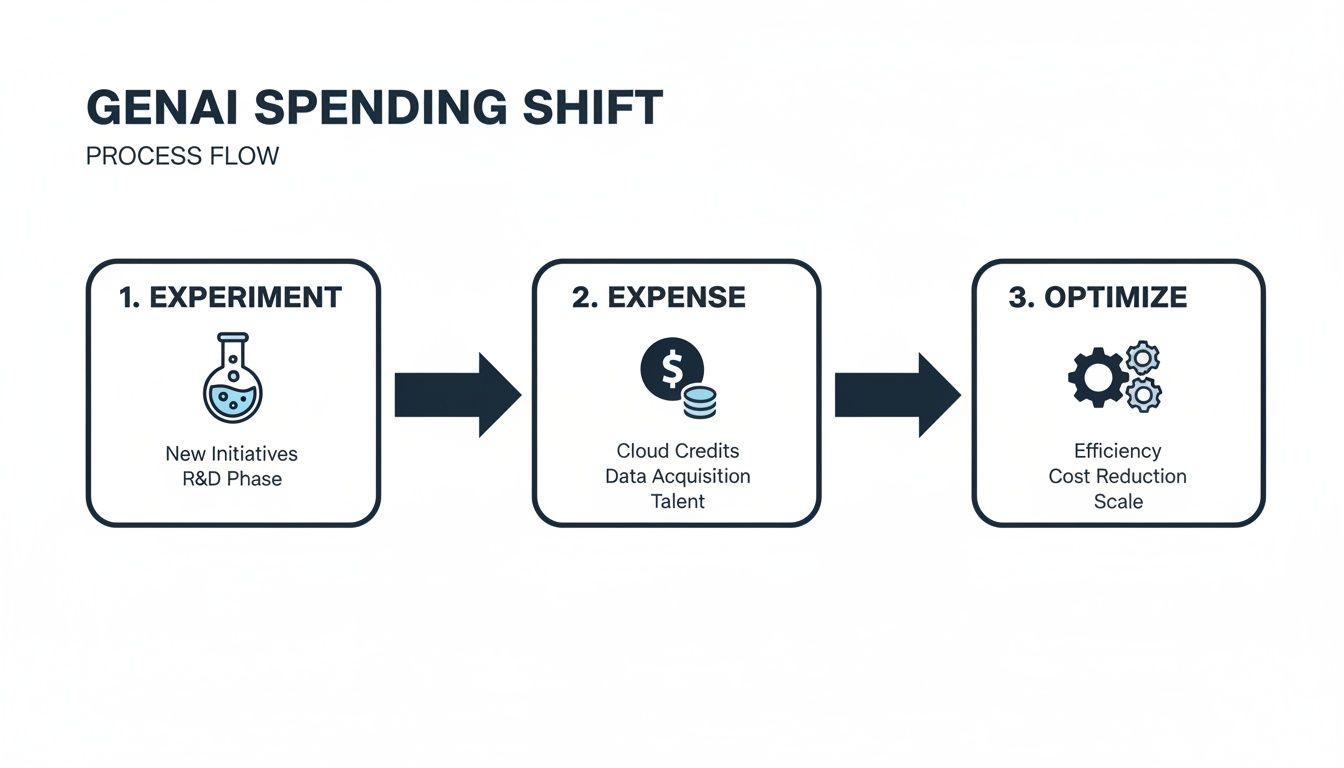
The goal is to move past that initial high-expense phase and into a mature state of continuous, deliberate optimization.
Here are three foundational architectural strategies to get you there:
- Implement Caching for Common Queries: Many of your users are asking the same questions. By caching the responses to frequent queries, you avoid redundant, expensive API calls to the LLM. This directly cuts costs and speeds up response times.
- Use Batch Processing for Non-Urgent Tasks: Not every GenAI task needs an instant answer. For things like generating weekly reports, analyzing large datasets, or processing a backlog of documents, batching requests together is far more efficient and often unlocks lower pricing from model providers.
- use Retrieval-Augmented Generation (RAG): RAG is a powerful technique that feeds the model external, up-to-date information right when it's needed. This reduces the demand for constant, expensive fine-tuning and lets you use smaller models by grounding them with specific context, which also lowers token consumption.
To really get a handle on the underlying infrastructure costs, it’s smart to integrate proven financial operations principles. For a deeper dive, check out this guide on FinOps best practices to optimize cloud spend.
Building a strategic plan for your AI stack is crucial. If you need a hand, our experts can guide your journey with our AI enablement services.
Impact Opportunity
By thoughtfully architecting your GenAI stack with caching, batch processing, and RAG, you can cut your API call volume by as much as 40-60% for certain workflows. This doesn't just deliver immediate cost savings—it builds a more resilient and scalable system for the long haul.
Key Takeaways
- The right model for the job is the most efficient one, not necessarily the most powerful.
- Architecting for cost efficiency from day one using techniques like caching, batching, and RAG is critical.
- Early architectural decisions have the largest downstream impact on your total GenAI spend.
Mastering The Levers Of Prompt And Data Engineering
Once your architecture is solid, it's time to zoom in on the real cost drivers: the prompts you write and the data you feed the model. Every single query is a micro-transaction, and mastering how you craft them can slash your token usage without ever compromising on quality.
The difference between a wasteful prompt and a cost-effective one is night and day. A vague, open-ended question forces the model to guess what you want, often spitting out a long, rambling, and expensive answer. But a sharp, well-structured prompt? That guides the model directly to a concise, targeted response, saving you tokens—and money.
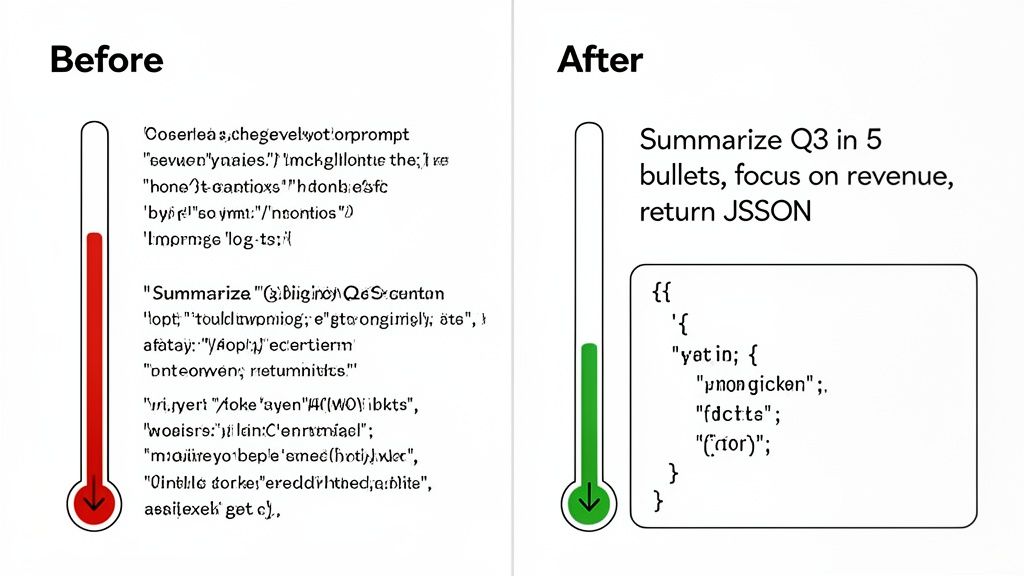
It’s a simple shift from conversational requests to direct instructions, and it's absolutely fundamental to cost control.
The Art and Science of the Cost-Effective Prompt
Think of your prompt as a job description for the AI. The clearer the instructions, the less time and resources it wastes. A sloppy prompt is like telling a new hire to "just do a report." A great one is like asking them to "summarize Q3 revenue growth in five bullet points, citing specific figures from the attached P&L."
Practical Example
- The Inefficient Prompt: "Summarize this long customer feedback report." This is too broad. The model has no clue what's important, how long the summary should be, or what format you need. You'll likely get a dense paragraph that costs more and still needs editing.
- The Cost-Effective Prompt: "Analyze the attached customer feedback report. Extract the top 3 most-mentioned product complaints. Present them as a JSON object with 'complaint' and 'mention_count' keys." This is specific, constrained, and format-driven. It tells the model exactly what to do, resulting in a much shorter, cheaper, and instantly usable output.
Your prompt is the single cheapest optimization tool you have. By creating a shared "prompt library" and running simple A/B tests, teams can routinely cut token spend by 20-30%. It’s often the lowest-hanging fruit.
Preprocessing Data to Reduce Token Load
It's not just about the prompt. The data you send in has a massive impact on your bill. Throwing a 100-page document at an LLM just to get a simple summary is like using a sledgehammer to crack a nut—incredibly inefficient. The model has to churn through every single token just to get started.
A much smarter approach is to preprocess your data before it ever hits the main model. This means cleaning, filtering, and condensing large inputs into something more manageable.
Here are a few ways to do it:
- Create preliminary summaries: Use a smaller, cheaper model to create a quick summary of a long document first. Then, feed that condensed version to your more powerful model for the heavy lifting. This two-step process is often far cheaper than a single call with the full doc.
- Chunk your data: Break long documents into smaller, relevant pieces. Instead of sending the whole text, you can use semantic search to pinpoint and send only the most relevant paragraphs to the model.
- Filter out the junk: Before sending anything to the model, strip out all the noise—HTML tags, boilerplate text, redundant chat history. Every single token you remove from the input is a direct cost saving.
To take this a step further, look into techniques like Retrieval Augmented Generation (RAG) Explained. RAG gives the model relevant, external information at query time, focusing its attention and reducing the need for massive, expensive context windows.
Impact Opportunity
Implementing a simple data preprocessing pipeline can cut your input token consumption by 50-75% on workflows dealing with large documents. You don't just cut API costs; you also get better results by giving the model cleaner, more focused context.
Key Takeaways
- Specific, well-structured prompts are a primary lever for reducing token consumption and cost.
- Preprocessing data by summarizing, chunking, or cleaning it before sending it to an LLM significantly cuts input token load.
- Every token removed from the input or output directly translates to a cost saving.
Implementing strong Monitoring And Cost Governance
You can't manage what you don't measure. After you've tweaked your models and tightened up your prompts, the next real step is getting total visibility and control over your GenAI spending. Without it, costs have a nasty habit of spiraling, driven by inefficiencies you can't even see.
This is about more than just getting a bill at the end of the month. It's about building a real-time feedback loop that connects every single API call to a specific business function and its actual cost. Real governance means you stop reacting to a surprisingly high invoice and start proactively managing your spend.
Building Your GenAI Cost Dashboard
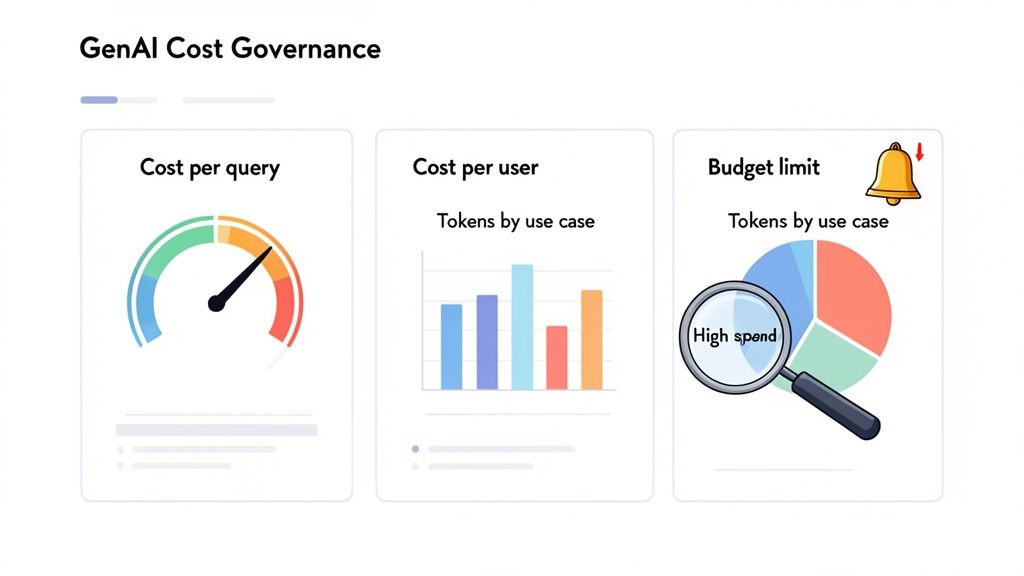
The cornerstone of good governance is a clear, actionable dashboard that tracks the right metrics. Your goal is to get past vanity numbers and dial in on KPIs that directly link GenAI usage to business value and, of course, cost. This dashboard needs to be the single source of truth for every team touching the tech.
Here are the essentials to start tracking immediately:
- Cost-Per-Query: This is your most fundamental unit of measurement. It shows you exactly what each interaction costs, letting you spot expensive outliers right away.
- Cost-Per-User/Department: Tying costs to specific users or teams is a game-changer for accountability. It shines a light on which departments are driving spend and where you need to focus your optimization efforts.
- Token Consumption by Use Case: This one is huge. Tag every API call with its function (e.g., "customer_support_summary," "sales_email_draft") to get granular insight into which workflows are burning through your budget.
Without granular tracking, you're just guessing whether your GenAI spend is driving ROI or just making noise. The simple act of tagging every API call with a use case and department can uncover massive savings opportunities hiding in plain sight.
Practical Example: Uncovering Hidden Costs
A B2B software company implemented a simple monitoring system and discovered that a single, poorly designed workflow in their customer support tool was responsible for 40% of their entire monthly GenAI bill. The workflow was feeding unnecessarily long conversation histories to the model for simple summarization tasks. By adding a quick preprocessing step to shorten the context, they slashed the cost of that one workflow by over 80%. This translated to tens of thousands of dollars saved for just a few hours of development work. That's the immediate ROI of putting strong governance in place.
From Monitoring To Active Governance
Seeing the numbers is the first step, but true control comes from active governance. This means setting clear rules and automated guardrails that stop runaway costs before they even happen. It’s about building a culture of cost-awareness across the entire organization.
Here are the key governance levers you need to pull:
- Set Department-Level Budgets: Give each team a clear monthly or quarterly GenAI budget. This creates ownership and makes them think critically about how they're using the models.
- Create Automated Usage Alerts: Set up alerts to ping team leads and finance when a department is hitting budget thresholds—say, at 50%, 75%, and 90% of their spend. No more end-of-month surprises.
- Implement Rate Limits and Throttles: For non-critical apps, set hard caps on API calls within a certain timeframe. This is your safety net against bugs or infinite loops that can rack up a terrifying bill in minutes.
Key Metrics For GenAI Cost Governance
To make this all stick, you need to track KPIs that tell the full story. The table below outlines the core metrics that connect your GenAI usage directly to cost efficiency and business outcomes.
| Metric | What It Measures | Why It Matters For Cost Efficiency |
|---|---|---|
| Cost Per Query | The direct cost of a single API call to a GenAI model. | Identifies high-cost interactions and helps compare the efficiency of different prompts or models for the same task. |
| Cost Per User/Team | The total GenAI spend attributed to an individual user, department, or project. | builds accountability and highlights which teams or use cases need optimization or budget review. |
| Token Consumption | The number of input and output tokens used per API call, tracked by use case. | Directly impacts cost. Reducing tokens through prompt engineering or context management is a primary cost-saving lever. |
| Latency (Response Time) | The time it takes for the model to generate a response. | While not a direct cost, high latency can lead to poor user experience, requiring more powerful (and expensive) models to fix. |
| Cache Hit Rate | The percentage of queries that are served from a cache instead of hitting the live model. | A high cache hit rate means you're avoiding redundant API calls, leading to significant direct cost savings. |
Tracking these metrics gives you the data-driven foundation needed to make smart, proactive decisions instead of just reacting to the monthly bill.
Calculating The Total Cost Of Ownership
Finally, effective governance means looking beyond just the API fees. A true Total Cost of Ownership (TCO) model gives you the complete picture of your investment. It forces you to account for all the resources needed to run your GenAI initiatives successfully.
Your TCO model absolutely has to include:
- Direct Model Costs: The pay-per-use API fees from providers like OpenAI or costs for provisioned throughput.
- Infrastructure Costs: The compute, storage, and networking for your applications, especially for things like vector databases in a RAG setup.
- Development and Personnel Costs: The salaries of the engineers and data scientists building and maintaining the features. Don't forget this part.
- Ongoing Maintenance: The time and resources spent monitoring, updating, and fine-tuning models and prompts over their entire lifecycle.
By tracking the full TCO, you can accurately measure the ROI of each project and make much smarter decisions about where to invest next. This comprehensive view is the cornerstone of a mature and truly cost-efficient GenAI strategy.
Key Takeaways
- You cannot control what you do not measure; granular monitoring by user, department, and use case is essential.
- Active governance through budgets, alerts, and rate limits transforms monitoring from a reactive to a proactive process.
- Calculating the Total Cost of Ownership (TCO), including personnel and infrastructure, is necessary for an accurate ROI assessment.
Scaling GenAI Initiatives With A Clear ROI
Taking a GenAI pilot from a controlled test to a full-scale deployment is where the real value—and risk—truly shows up. The trick to getting this right is de-risking the whole process with a phased rollout. Every dollar you put in has to be tied directly to a business outcome you can actually measure. This ensures you're driving profitability, not just bigger cloud bills.
It all starts small. You prove tangible ROI with targeted pilots, then use that evidence to make smarter calls on broader rollouts, vendor contracts, and long-term architecture.
Designing Pilots That Prove Business Value
A successful GenAI pilot isn’t a tech demo; it’s a business case. The goal is to show a direct, measurable impact on your KPIs, not just prove the model works. Forget fuzzy metrics like "user engagement." You need to focus on concrete outcomes that your leadership team actually cares about.
When you nail this, your early efforts build real momentum and get you the buy-in needed for bigger investments.
Practical Examples
- Customer Support: Don't just track chatbot accuracy. Instead, measure the reduction in average customer support response time or the increase in first-contact resolution rate. These metrics tie directly to lower labor costs and happier customers.
- Sales Enablement: An AI-powered sales assistant pilot should be measured by the increase in qualified leads generated or the reduction in time spent by sales reps on admin tasks. When you can link a pilot to pipeline growth, its value is hard to argue with. You can dive deeper into this in our guide to AI-powered lead generation strategies.
- Content Marketing: Forget about just counting the number of articles produced. Measure the decrease in cost-per-article or the improvement in SEO rankings for AI-assisted content. This connects the tech straight to marketing efficiency and hitting your lead goals.
Across the board, GenAI has moved past cool anecdotes into hard numbers. Real-world deployments are showing average labor cost savings around 25% today, and that's projected to climb toward 40% as the tools get better. Businesses that have integrated generative AI are reporting average cost savings of 15.7% and a 24.69% jump in productivity. The proof is in the data, as shown in this in-depth analysis of GenAI usage statistics.
Scaling GenAI responsibly means treating every pilot as a mini-business case. Focus on proving a clear, quantifiable return on investment tied to core business metrics. This approach not only de-risks larger investments but also builds the internal momentum needed for successful, widespread adoption.
Strategic Vendor and Contract Negotiation
Once your pilots prove successful, your usage will grow, and so will your use. This is your cue to move past pay-as-you-go pricing and start talking to vendors about better terms. A little proactive negotiation here can lock in some serious long-term savings.
Your pilot data is your best negotiation tool. Use your proven usage patterns and growth forecasts to your advantage.
Here are a few tips that have worked for us:
- use Volume for Discounts: Take your usage data to vendors and negotiate for volume-based discounts or enterprise pricing. Most providers are happy to offer lower rates for a longer-term commitment and a predictable revenue stream.
- Explore Provisioned Throughput: If you have high-volume, predictable workloads, ask about provisioned throughput. You pay a flat fee for a dedicated amount of inference capacity, which can be way cheaper than on-demand, per-token pricing for steady applications.
- Negotiate Favorable Terms: Price isn't everything. Push for better terms around service level agreements (SLAs), data privacy, and support. A strong SLA can save you from costly downtime, and clear data governance terms protect your most valuable asset.
Navigating The Build vs Buy Decision
As your GenAI work matures, you'll inevitably hit the "build vs. buy" crossroads. Do you stick with a vendor's API, or is it time to invest in building and hosting your own models? This is a huge strategic decision with long-term cost implications.
Honestly, the right answer depends entirely on your scale, your needs, and the expertise you have in-house.
- When to Buy (Use Vendor APIs): For most companies just starting out, using a commercial API is a no-brainer. You get instant access to state-of-the-art models with zero infrastructure headaches. It's perfect for rapid prototyping, apps with unpredictable traffic, and teams without a deep bench of AI/ML experts.
- When to Build (Host Your Own Models): Building starts to make sense when you reach massive scale, have very specific domain needs, or are dealing with strict data privacy and regulatory rules. The upfront investment in infrastructure and talent is big, but it can lead to a much lower cost-per-query in the long run and give you total control over your AI stack.
A phased approach is almost always the smartest path. Start by "buying" to prove value and find product-market fit. As your usage scales and your needs get more specialized, you can start to selectively "build" where the economic case is strongest. This hybrid strategy gives you the best balance of cost, performance, and control.
Key Takeaways
- Frame every GenAI pilot as a business case focused on measurable KPIs like cost reduction or revenue growth.
- Use data from successful pilots as use to negotiate better pricing and terms with vendors.
- The "build vs. buy" decision should be based on your scale, domain-specific needs, and in-house expertise, often starting with "buy" and evolving to a hybrid approach.
Your Questions About GenAI Cost Efficiency, Answered
Let's be honest: navigating the financial side of generative AI can feel like a moving target. New models, shifting price tags, and a constant stream of "new best practices" make it hard to keep up.
This section tackles the real, practical questions I hear from leaders trying to get a handle on their GenAI spend. My goal is to give you quick, clear answers to help you sidestep the common traps and make smarter financial decisions from day one.
Should We Use Pay-As-You-Go Or A Commitment Model?
This is the classic "rent vs. buy" dilemma of the AI world. The right answer isn't about which one is universally better—it’s about which one fits your current stage of development.
Pay-as-you-go is your best friend when you're just starting out. It's perfect for new projects, apps with wildly unpredictable traffic, or when you're still in the experimentation phase. You get maximum flexibility with zero upfront commitment, letting you scale up or down without getting penalized. Think of it as your GenAI pilot program’s safety net.
But once you have a steady, high-volume workload, a commitment model (sometimes called provisioned throughput) almost always wins on price. By locking in a certain amount of inference capacity for a set term, providers often give you steep discounts—sometimes knocking off as much as 50% compared to on-demand rates. This is the smart move for mature applications with predictable demand, like an internal knowledge base that fields thousands of queries every single day.
My Advice: Start with pay-as-you-go to get a clear baseline of your usage patterns. Once your traffic stabilizes and hits a consistent volume, use that data to negotiate a commitment that locks in serious long-term savings.
What Are The Hidden Costs Of Open-Source Models?
The idea that open-source models are "free" is one of the biggest misconceptions in the industry. While you're not paying a per-token fee to a vendor, the total cost of ownership can easily sneak up on you and includes several easily overlooked expenses.
- Hefty Infrastructure Bills: You're on the hook for all hosting costs, which means paying for the powerful (and expensive) GPU instances needed for inference. These compute costs can balloon quickly, especially as you scale.
- Specialized MLOps Teams: Deploying, managing, and maintaining an open-source model isn’t a part-time job. It requires a dedicated team of MLOps engineers, and their salaries and time are a major operational expense.
- The Security and Compliance Burden: When you go open-source, you own all the risk. You’re responsible for securing the model, patching vulnerabilities, and making sure it complies with data privacy regulations like GDPR or CCPA. This means ongoing audits and governance efforts that come with their own price tag.
Practical Example
A company might feel great about saving $20,000 a month in API fees by switching to an open-source model. But if they end up spending $30,000 a month on the necessary GPU fleet and the salaries of two MLOps engineers just to keep it running, they've actually lost money. This illustrates how the "free" model can quickly become more expensive than a commercial API when TCO is considered.
What’s The First Thing To Do After A Sudden Cost Spike?
Seeing a sudden, unexpected jump in your GenAI bill is jarring. The instinct is often to panic, but the first step is to diagnose, not react. Shutting down services can disrupt the business, but ignoring the problem is a great way to blow your budget.
Your immediate action item is to pull up your monitoring dashboard. The single most important metric to look at is cost attribution by use case or department. This will instantly tell you which workflow, feature, or team is driving the surge.
Once you’ve identified the source, you can dig deeper. The usual suspects include:
- A bug that’s sending an application into an infinite loop of API calls.
- A new feature that was rolled out without proper prompt optimization.
- A team using a massive, expensive model for a task a much smaller model could handle.
By setting up granular monitoring and tagging from the very beginning, you can cut your diagnostic time from days down to minutes. This lets you isolate the issue and deploy a fix—like patching a bug or rolling back a faulty feature—before it does any more financial damage.
Key Takeaways
- Choose pay-as-you-go for flexibility in early stages and commitment models for cost savings on mature, predictable workloads.
- Open-source models are not free; their Total Cost of Ownership includes significant infrastructure, personnel, and compliance expenses.
- After a cost spike, use monitoring dashboards to immediately diagnose the source by use case or department before taking action.
At Prometheus Agency, we help you build a real framework for GenAI cost governance, not just a spreadsheet. Our experts work with you to implement the right monitoring, select cost-effective models, and design a scalable AI strategy that ties every dollar you spend to a clear business return. Start your journey with a complimentary Growth Audit and AI strategy session.