A 40-person SaaS company can have a support inbox that looks busy without creating much customer value. Tier-1 representatives spend most of their day resetting SSO credentials, locating invoices, and answering questions about basic account settings. Meanwhile, renewal conversations wait, technical escalations lose momentum, and customers start repeating information across channels.
An AI customer service agent can change that pattern, but only if you design it as an operational system rather than a chatbot with a script tree. The agent should understand a customer's request, decide whether it can resolve the issue, use connected business systems to take action, and escalate with the full context when a person needs to step in.
The opportunity is significant. One industry source reports that AI-powered chatbot use among customer service teams rose from 5% in 2020 to more than 80% in 2025, a 16x increase, while 56% of businesses globally use AI for customer service and 88% of contact centers use some form of AI-powered solution (AI customer service adoption data). But adoption alone doesn't produce better service.
Key Takeaways
- Design escalation before automation. The handoff determines whether customers feel helped or abandoned.
- Automate transactional work first. Identity, billing, entitlement, and status workflows are easier to govern than complex troubleshooting.
- Preserve context. Transfer the conversation, customer record, intent, urgency, prior actions, and unresolved questions to the human agent.
- Measure resolution quality, not deflection alone. A fast response that fails to solve the issue creates a more expensive interaction later.
- Keep humans available by design. Trust, compliance, technical complexity, and account risk all require clear human ownership.
The rest of this guide treats AI service agents through that lens, covering the operating model, use cases, architecture, ROI, risk controls, and a practical pilot plan.
The AI Customer Service Agent Reality for B2B Growth Leaders
The first mistake growth leaders make is defining the problem as ticket volume. The core issue is misallocated human attention. Repetitive requests consume the same support capacity that should protect renewals, unblock implementations, and reassure strategic accounts during incidents.
An AI customer service agent is software that reads a customer's question, identifies intent and urgency, checks relevant business data, and chooses an action. It might reset a credential, retrieve an invoice, validate an entitlement, create a case, or route the interaction to a specialist. The important distinction is that it can work across connected systems instead of merely selecting a scripted reply.
That distinction matters in B2B because customer questions often depend on account-specific facts. “Can I use this feature?” may require a plan lookup. “Why was I billed?” may require invoice and contract data. “Is our environment affected?” may require product status, account configuration, and incident context. A generic answer can sound polished while still being wrong.
Why the timing matters
Customer service leaders face pressure from several directions at once. Customers expect faster responses, finance teams scrutinize support cost, and executives want service to contribute to retention and expansion rather than operate as a disconnected cost center. The 2026 buyer expectation is clear in practice, B2B support should feel as immediate and coherent as the best consumer experiences, without sacrificing the account knowledge enterprise customers require.
The strongest evidence supports an augmentation model, not a replacement fantasy. A large e-commerce after-sales field experiment found that a generative AI assistant improved service speed and quality for human agents, with especially strong effects among less-experienced workers. The assistant also increased engagement, reflected in higher message volume and a higher agent-to-customer message ratio (field experiment on generative AI in customer support).
Practical rule: If your agent can't explain what it knows, what it changed, and why it escalated, it isn't ready for unsupervised customer traffic.
The thesis for B2B leaders is simple. Escalation design and customer-context preservation matter more than headline deflection rates. Automate the work that has clear inputs, safe actions, and predictable outcomes. Keep humans responsible for ambiguity, risk, emotion, and commercial judgment.
How an AI Customer Service Agent Actually Works
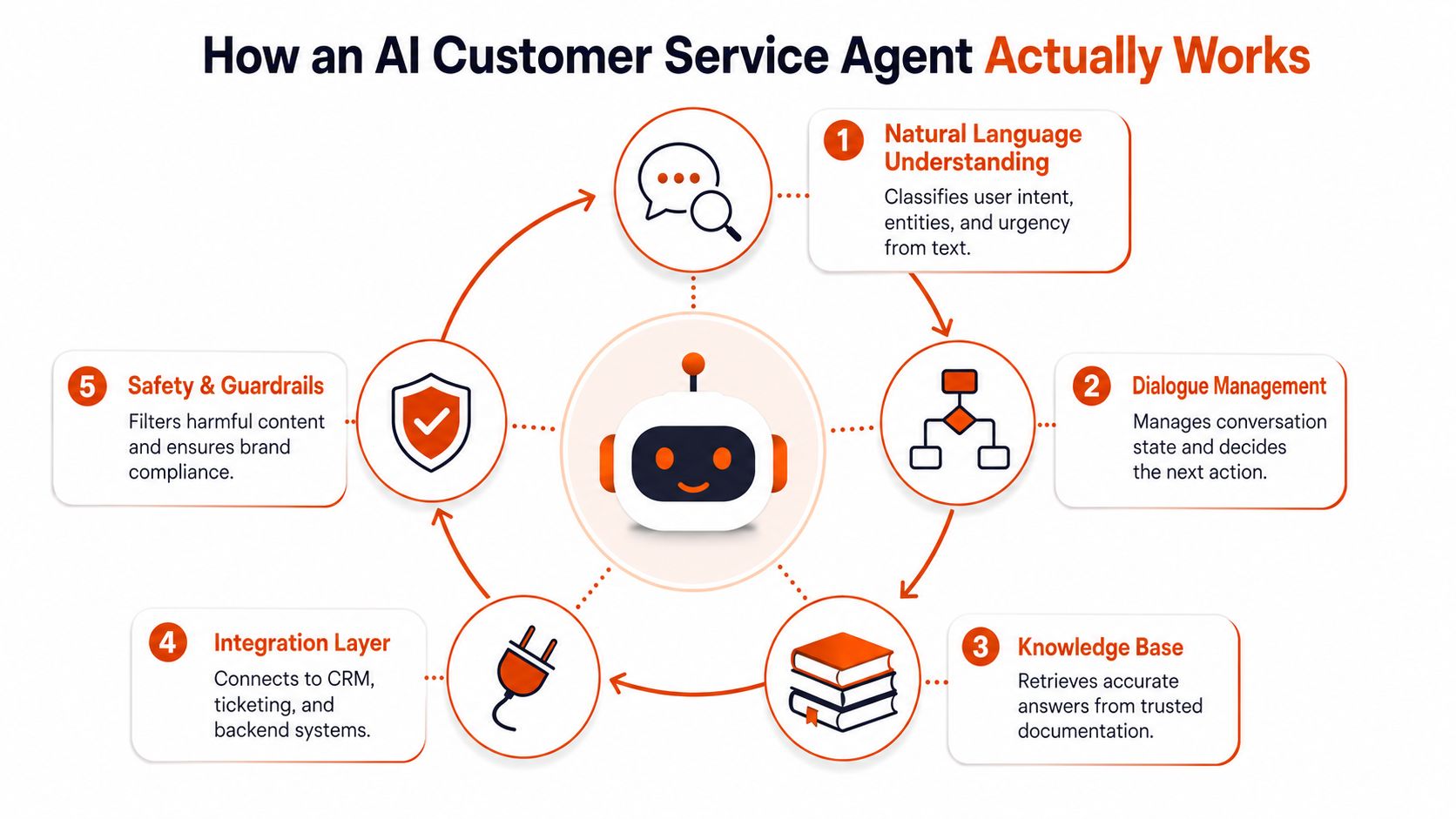
An agent stack has several layers, and each layer creates a different failure mode. The language model gets attention because it writes the answer, but the surrounding systems determine whether that answer is grounded, actionable, and safe.
The five operating components
Natural language understanding interprets messy enterprise writing. It classifies intent, extracts entities such as account names or invoice references, and detects urgency. A customer may describe an access failure without using the words “SSO” or “authentication,” so the system must recognize the underlying issue.
LLM reasoning plans the next step. It can ask a clarifying question, retrieve documentation, call a tool, or draft a response. The model should reason against approved information and available actions, not improvise policy or commercial terms.
Knowledge retrieval supplies the source material. That includes help center articles, product documentation, internal runbooks, release notes, and carefully selected historical resolutions. Indexing is only useful when ownership and freshness are clear. A beautifully searchable repository of outdated instructions remains a liability.
Integrations turn language into operations. CRM, ticketing, billing, identity, order, and entitlement systems provide the live data needed to resolve a request. The agent may read a contract record, confirm a license, create a case, or write a summary back to the account.
Escalation controls the boundary between automation and human service. It determines when the agent should stop, what context it should pass, who owns the unresolved case, and how the queue should prioritize it.
Why the last layers decide the outcome
A measurement study found that AI assistance increased agent throughput by 13.8% inquiries per hour and improved quality by 1.3% in successfully resolved problems. The lowest-performing 20% of agents achieved a 35% improvement in task throughput, which supports a practical deployment priority, use AI to accelerate junior and lower-skill staff rather than limit it to simple automated cases (AI productivity measurement in customer support).
The model matters, but it isn't the operating model. Weak knowledge governance produces unsupported answers. Weak integrations produce explanations without resolution. Weak escalation produces repetition, dead ends, and avoidable churn.
High-Value Use Cases B2B Teams Should Automate First
Start with requests that have high volume, low ambiguity, and reversible actions. Don't begin with every support category. Begin where a successful result can be verified by the system itself.
SSO and password resets are the obvious opening move. The agent authenticates the requester, triggers the approved reset flow, and confirms the next step. License assignment follows a similar pattern when the CRM or administration system exposes available seats and permission rules.
Invoice and contract lookups are useful when the agent can show the correct record without interpreting sensitive language beyond its authorization. For example, it can locate an invoice date and payment status, then route a dispute to billing rather than inventing an explanation.
Move from answers to account-aware actions
The next tier depends on CRM and product data. An agent can check order status, validate an entitlement, or answer whether a feature belongs to a customer's plan. A question such as “Can our regional team use the analytics module?” should trigger an account lookup, not a generic documentation link.
The third tier is intelligent triage. The agent classifies an enterprise ticket, enriches it with account health information, identifies the relevant product area, and routes it to the correct support pod. That workflow creates value even when a human still owns the resolution.
Proactive workflows belong later. The agent can detect renewal risk from repeated support signals, prepare QBR briefs from ticket history, or flag expansion opportunities when administrators ask about unused features. These workflows need stronger governance because they affect commercial decisions and customer relationships.
If your team handles inbound calls as well as digital tickets, a workflow such as Machine Marketing lead capture solution can help preserve speed between a missed call and the next customer interaction. The principle is the same, capture intent and context before the opportunity disappears.
| Use Case | Complexity Tier | Required Integrations | Example Scenario |
|---|---|---|---|
| SSO and password resets | Tier 1 | Identity and ticketing | A verified user completes an approved reset flow |
| License assignment | Tier 1 | Identity, administration, CRM | An admin assigns an available seat |
| Invoice and contract lookups | Tier 1 | Billing, CRM, ticketing | A customer checks invoice status and receives the correct record |
| Order status and entitlement validation | Tier 2 | CRM, order, product catalog | The agent confirms whether a feature is included |
| Enterprise ticket triage | Tier 3 | Ticketing, CRM, account health | A high-risk issue reaches the correct support pod |
| Renewal-risk detection and QBR preparation | Tier 4 | CRM, ticket history, product usage | Repeated support patterns trigger an account review |
Ship the first two tiers in 30 days if the data is usable and the permissions are defined. Treat triage and proactive growth workflows as 90-day goals, with explicit review points before expanding autonomy.
Designing the AI to Human Handoff That Customers Do Not Hate
A customer shouldn't need to restate the problem because your automation changed channels. Yet that's exactly what happens when teams optimize the initial response and ignore the transfer.
A cold transfer sends the customer to a human queue with little or no conversation history. It may be easy to implement, but it pushes the work back onto the customer and forces the representative to reconstruct the case.
A context-passing transfer sends the transcript, detected intent, entities, sentiment signals, authentication state, actions already attempted, relevant CRM fields, and the unresolved question. The human opens the case with a working brief rather than a blank screen.
An embedded co-pilot keeps the AI active behind the human agent. It summarizes the thread, retrieves relevant policy, suggests next actions, and surfaces account details while the representative owns the conversation. This is often the right pattern for technical or commercially sensitive issues.
| Handoff Pattern | Context Preserved | Customer Friction | Best For |
|---|---|---|---|
| Cold transfer | Minimal | High, customer repeats the issue | Low-risk overflow where speed matters more than continuity |
| Context-passing transfer | Transcript, intent, actions, account state | Low | Complex cases requiring human ownership |
| Embedded co-pilot | Full working context with human control | Low | Technical, high-value, or emotionally charged interactions |
Set escalation triggers before launch. Use low confidence, repeated failed attempts, conflicting account data, explicit requests for a person, detected churn risk, security concerns, billing disputes, and incident language as handoff conditions. The agent should also escalate when a customer has already provided the same information and the system still can't act.
The handoff is part of the product experience, not an exception path.
Ownership must be explicit. A named queue or role should receive the case, the SLA should start at the correct point, and the customer should know what happens next. Prioritize cases using account tier, incident severity, renewal proximity, business impact, and customer history, not sentiment alone.
For a deeper operating comparison, review these agent-to-human handoff strategies. Keep the AI in the loop as a real-time assist when it can retrieve information or summarize safely, but don't let it continue speaking to the customer once the human has assumed ownership.
Integrating an AI Customer Service Agent Into Your CRM and Workflows
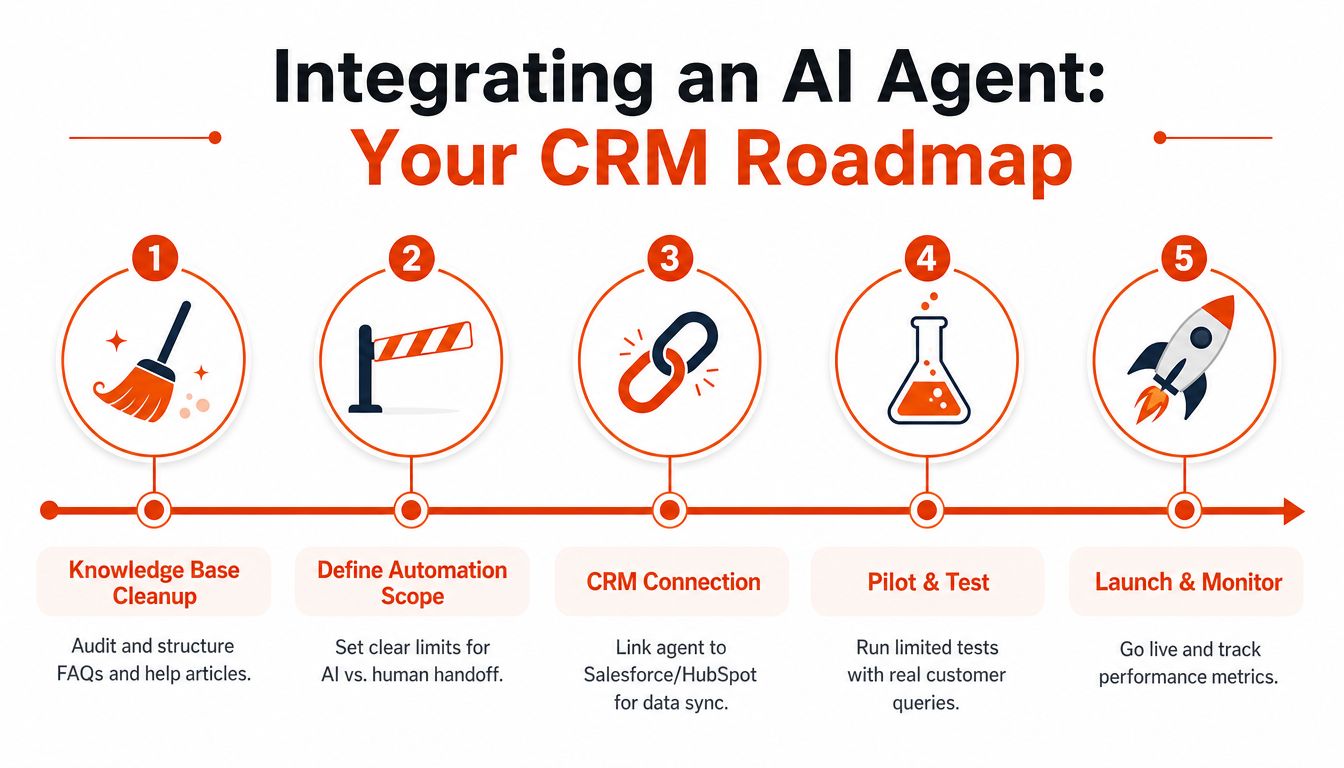
Integration starts with content, not software. Assign owners to the knowledge base, remove contradictory FAQs, archive obsolete product instructions, and separate customer-facing guidance from internal runbooks. The agent can only be as reliable as the material it retrieves.
Build the data path in operating order
Connect the agent to Salesforce, HubSpot, or Dynamics after the content audit. Start with bi-directional synchronization for contacts, cases, account records, and the custom objects that affect service decisions. Read access should come before write access, and every write action should have a defined permission boundary.
Identity resolution is a common source of silent failure. Duplicate accounts, stale product catalogs, inconsistent contract fields, and mismatched email domains can cause the agent to associate a customer with the wrong record. Test account matching with real variations, including aliases, subsidiaries, and shared inboxes.
Map the workflow before enabling actions. Define ticket creation rules, routing queues, tags, SLA categories, escalation states, and ownership transitions. A customer should never enter an unresolved state without a queue, a responsible team, and a visible next step.
Prepare the team, then clear security gates
Internal enablement should cover what the agent can do, what it must not do, how representatives correct it, and where feedback goes. Give support staff a simple way to flag bad intents, missing articles, unsafe suggestions, and incorrect account matches. Review that feedback on a recurring cadence and tune the system from actual interactions.
Use this CRM integration guidance for AI systems when mapping data, permissions, and workflow ownership. Before live traffic, validate access controls, data retention, audit logging, vendor processing terms, prompt and retrieval boundaries, and the kill switch for every autonomous action.
A staged pilot is safer than a broad launch. Begin with read-only answers or agent assistance, then enable narrowly scoped writes after the system demonstrates reliable behavior.
Measuring ROI and Proving Impact to the Executive Team
Executives don't need a larger deflection number. They need evidence that customers reach resolution with less friction and that human capacity moves toward work that protects revenue.
Start with a baseline. Tag the current ticket mix by intent, complexity, channel, account value, escalation reason, resolution status, and time to resolution. Run the agent in shadow mode before changing customer-facing behavior, so you can compare its proposed actions with the decisions experienced representatives make.
Use a balanced scorecard
Track deflection only when it includes successful resolution quality. Pair it with first-contact resolution, average handle time, CSAT after handoff, agent capacity recovered, and pipeline-influenced revenue from renewal-risk interventions. A customer who stops replying isn't a successful resolution.
The short operational view should focus on whether the agent classifies correctly, retrieves the right content, completes approved actions, escalates appropriately, and gives the human a usable summary. The longer commercial view should connect service signals to retention, renewal confidence, expansion conversations, and account health.
| Time Horizon | Primary KPIs | Measurement Method | What It Proves |
|---|---|---|---|
| Baseline | Ticket mix, resolution time, CSAT, escalation reasons | Tag historical interactions and review samples | Establishes the starting operating picture |
| First 60 days | First-contact resolution, handle time, handoff CSAT, agent capacity | Compare pilot traffic with baseline and shadow-mode results | Shows whether service operations improved |
| First 12 months | Retention influence, renewal-risk interventions, expansion signals | Connect service events to CRM opportunity and renewal records | Shows whether service contributes to growth |
| Ongoing governance | Error types, unsafe outputs, context loss, routing quality | Weekly QA sampling and incident review | Shows whether performance remains controlled |
A recent Forrester projection says one in four brands will achieve a 10% increase in successful simple self-service interactions by the end of 2026, which reinforces the near-term opportunity in narrow, simple requests rather than complex replacement of human support (Forrester's 2026 customer service projection).
Board-level framing: Report hours recovered, resolution quality, customer trust, and revenue protection. Treat raw automation volume as an operating diagnostic, not the business case.
Compliance, Trust, and the Risk of Over Automating Support
Pure-deflection playbooks create the bigger risk for B2B leaders. They optimize the interaction that disappears from the queue while ignoring the customer who still needs help, and they can turn a minor issue into a trust problem during renewal or an incident.
Consumer research reflects that tension. One survey found 79% prefer humans, 84% believe humans are more accurate, and 89% want an always-available human option (customer service trust and preference data). Those figures don't mean every interaction should be human-first. They do mean the human route must remain obvious, accessible, and credible.
Another source reports that 66% of customer service organizations use AI agents and 70% report measurable value within 60 days, while consumer-side findings show that nearly one in five consumers received no benefit from AI customer service and 75% felt frustrated by a fast AI response that still left them dissatisfied (customer service AI adoption and handoff findings). The practical lesson is direct, speed without resolution is not a customer experience strategy.
Treat regulation as an operating requirement
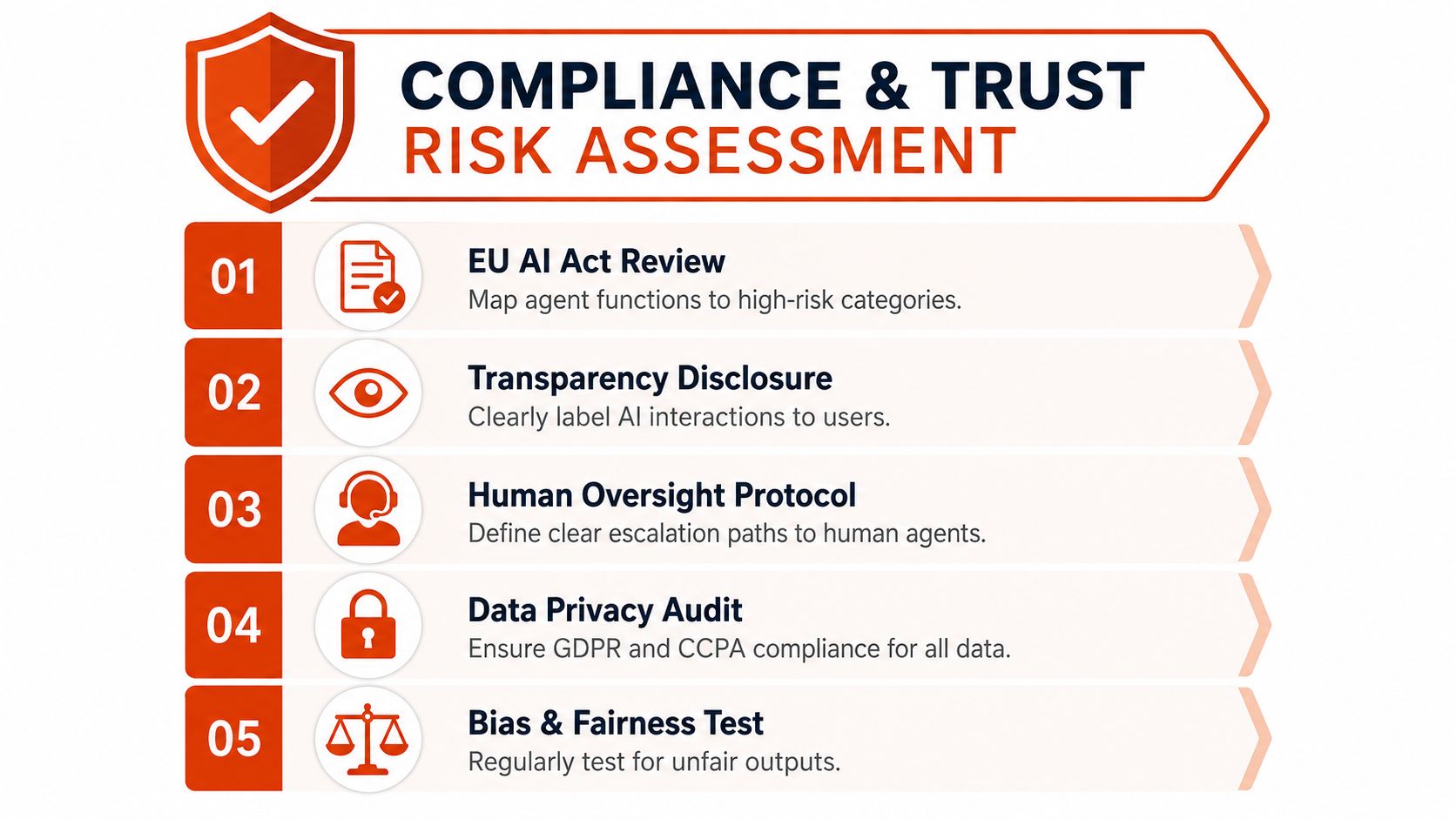
From August 2, 2026, the EU AI Act creates customer-service obligations for organizations serving EU customers. The requirements include disclosing AI use at the point of interaction, providing a human escalation route, disclosing emotion-recognition systems, and demonstrating staff AI literacy, including for businesses based outside the EU (EU AI Act customer-service checklist).
GDPR data minimization should shape transcript handling, especially if conversations may enter model improvement workflows. SOC 2 controls should cover access permissions and logs for customer data and agent actions. Don't allow the system to interpret contract, billing, compliance, or security language without strict boundaries and human review.
Use a defensive checklist:
- Disclose AI involvement: Make the interaction clear at the point of contact.
- Preserve human opt-out: Let customers request a person without navigating a maze.
- Audit weekly: Review a meaningful sample for accuracy, tone, policy errors, and lost context.
- Limit autonomy: Require approval for contract, billing, compliance, and security actions.
- Test routing fairness: Check whether sentiment or language patterns produce inconsistent access to human support.
Restraint is a competitive advantage. Enterprise customers remember whether your system took responsibility when something went wrong.
A 30 60 90 Day Plan to Evaluate Vendors and Launch a Pilot
Don't run a six-month RFP before defining the work. Choose three measurable jobs, identify the systems they require, and establish what a successful resolution means for each one.
Days 1 to 30
Select three narrow use cases, baseline current CSAT and resolution time, and collect representative conversations. Shortlist four vendors and score them against the criteria below. Include total cost per resolved ticket, not just licensing cost, because implementation effort, knowledge maintenance, and human escalation affect the underlying economics.
| Criterion | What to Assess |
|---|---|
| NLU accuracy | Intent, entity, urgency, and language handling on your real tickets |
| Escalation design | Trigger quality, context transfer, routing, and ownership controls |
| CRM integration depth | Read and write access across records, cases, and relevant custom objects |
| Data residency | Processing locations, retention controls, and contractual protections |
| Total cost per resolved ticket | License, implementation, maintenance, human review, and escalation cost |
| Governance | Audit logs, permissions, testing tools, and kill-switch controls |
Days 31 to 60
Run a contained pilot in one channel and one customer segment. Use shadow mode for two weeks, then move to live service only after the team reviews real examples. Set hard stop criteria for unsafe answers, failed escalation, incorrect account matching, and repeated context loss.
Keep a human owner accountable for every unresolved case. Review transcripts with support, RevOps, security, and customer success, because each group sees a different failure mode.
Days 61 to 90
Add a second channel only after the first has stable operations. Instrument the ROI dashboard, compare pilot performance with the baseline, and connect support events to renewal and expansion records. Present the result using operational, customer, and commercial evidence, not a single automation headline.
Hand this checklist to your RevOps or support lead:
- Choose three jobs with clear resolution criteria.
- Assign knowledge and workflow owners.
- Confirm identity, CRM, billing, and ticket permissions.
- Define escalation triggers and human queues.
- Run shadow mode before live traffic.
- Set kill-switch conditions.
- Review quality weekly.
- Report resolution quality alongside capacity and revenue impact.
For vendor selection criteria and implementation considerations, use this guide to evaluate the best AI agent options. The right vendor is the one that fits your data, workflows, risk tolerance, and escalation model, not the one that promises the highest automation rate.
Prometheus Agency helps growth leaders design AI customer service pilots, connect agents to CRM workflows, and build escalation systems that preserve customer context. Visit Prometheus Agency to request a Growth Audit and AI strategy session focused on measurable service and revenue outcomes.