You've probably seen this movie before. A prospect fills out a form, the notification lands in a shared inbox, someone exports a list to a spreadsheet, sales waits for context, and marketing manually adds the contact to a nurture sequence. By the time the handoff is complete, the buyer's intent has cooled and nobody can say exactly where the process stalled.
Marketing workflow automation fixes more than individual tasks. Done properly, it turns your CRM, campaign tools, data rules, human approvals, and measurement into a living revenue operating system. The aim isn't to remove judgment from marketing. It's to reserve judgment for decisions that need it, while software handles repeatable routing, timing, enrichment, alerts, and follow-up.
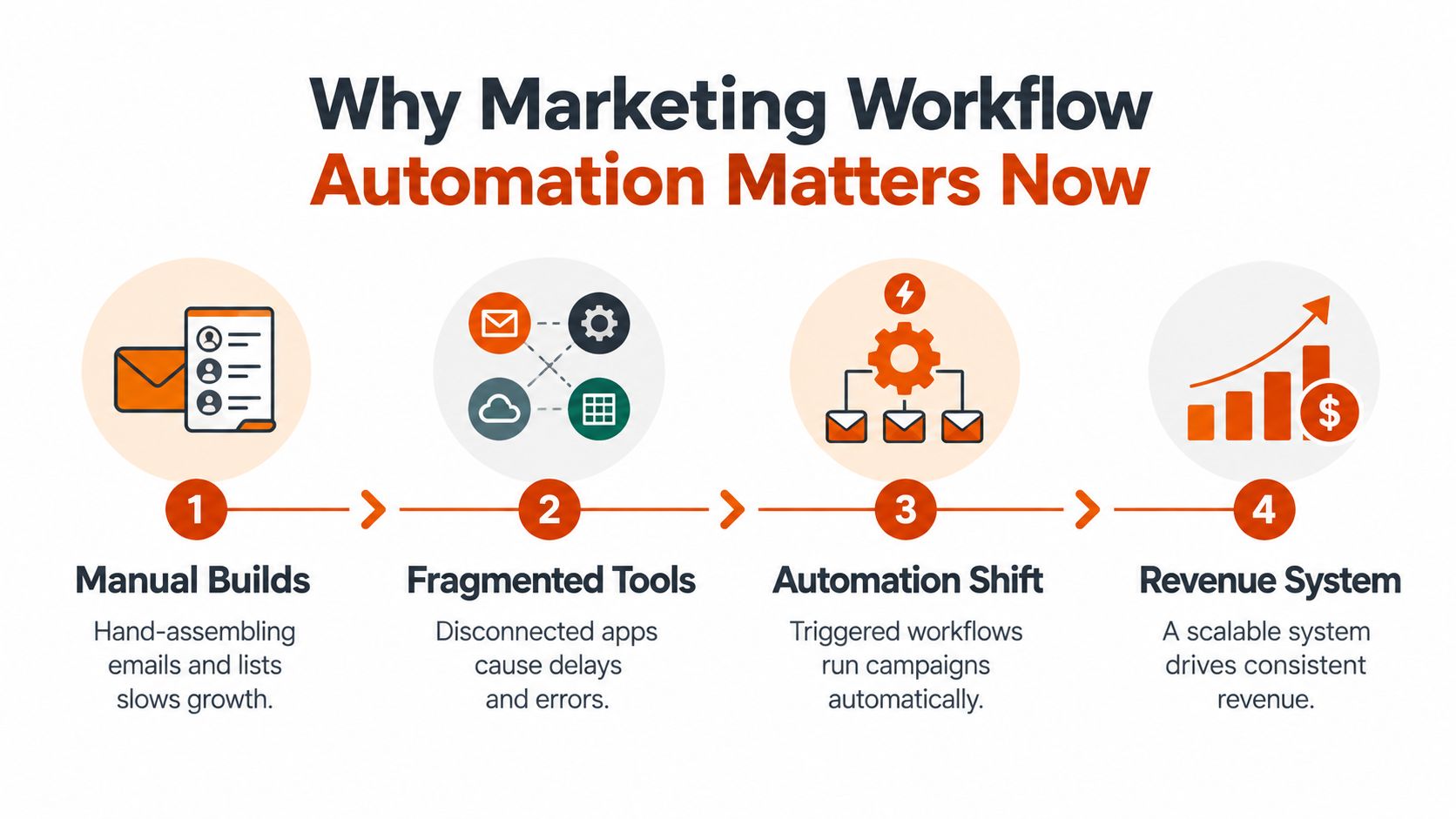
Why Marketing Workflow Automation Matters Now
A campaign can look healthy in each individual tool while the revenue process fails between them. Event leads sit in one spreadsheet, email status in another, and the CRM holds a third version of the record. Marketing updates one system, sales checks another, and operations later reconciles the differences. The result is slower follow-up, inconsistent execution, and unclear ownership.
Marketing workflow automation provides a shared operating layer for those decisions and handoffs. A form submission can create or update a CRM record, apply a lifecycle stage, assign an owner, send a relevant response, and alert sales when a buying signal meets agreed criteria. The system supplies context and timing. The salesperson still handles the conversation.
The category developed through several product waves. Marketing Automation Insider's history of the category places the first marketing automation solutions in 1992, when Unica emerged. Eloqua followed with an early solution in 1999, while HubSpot, Pardot, and Marketo launched by the mid-2000s. These platforms helped standardize triggered email, CRM-linked pipelines, lead nurturing, and multi-step customer journeys.
That history matters because automation did not begin with generative AI. The market matured through better triggers, data synchronization, segmentation, and orchestration. Growth accelerated in the late 2000s and early 2010s, when one estimate placed market expansion from $225 million to $1.65 billion in five years, alongside more than $5.5 billion in acquisitions by Salesforce, IBM, Adobe, and Microsoft, as documented in the same marketing automation history timeline. Consolidation made workflow automation an enterprise capability instead of a standalone point solution.
Key Takeaways
- Automation is an operating system, not a switch you turn on. It requires ownership, governance, monitoring, and iteration.
- Partial automation is normal. Connect the working pieces across marketing, sales, and operations before adding more complexity.
- Behavior-based logic beats rigid sequences. A buyer's actions should influence the next step more than an arbitrary calendar delay.
- Human judgment still belongs in the workflow. Approvals, exceptions, strategic decisions, and sensitive customer interactions need explicit handoffs.
- Start with familiar use cases. Onboarding, re-engagement, lead routing, reporting alerts, and nurture flows provide practical places to identify impact.
Teams seeking a broader operating perspective can review this guide to improve marketing efficiency. The operating shift is to stop rebuilding each campaign as a custom production project. Reusable patterns should handle reliable work consistently, while governance keeps those patterns accurate as data, teams, and customer behavior change.
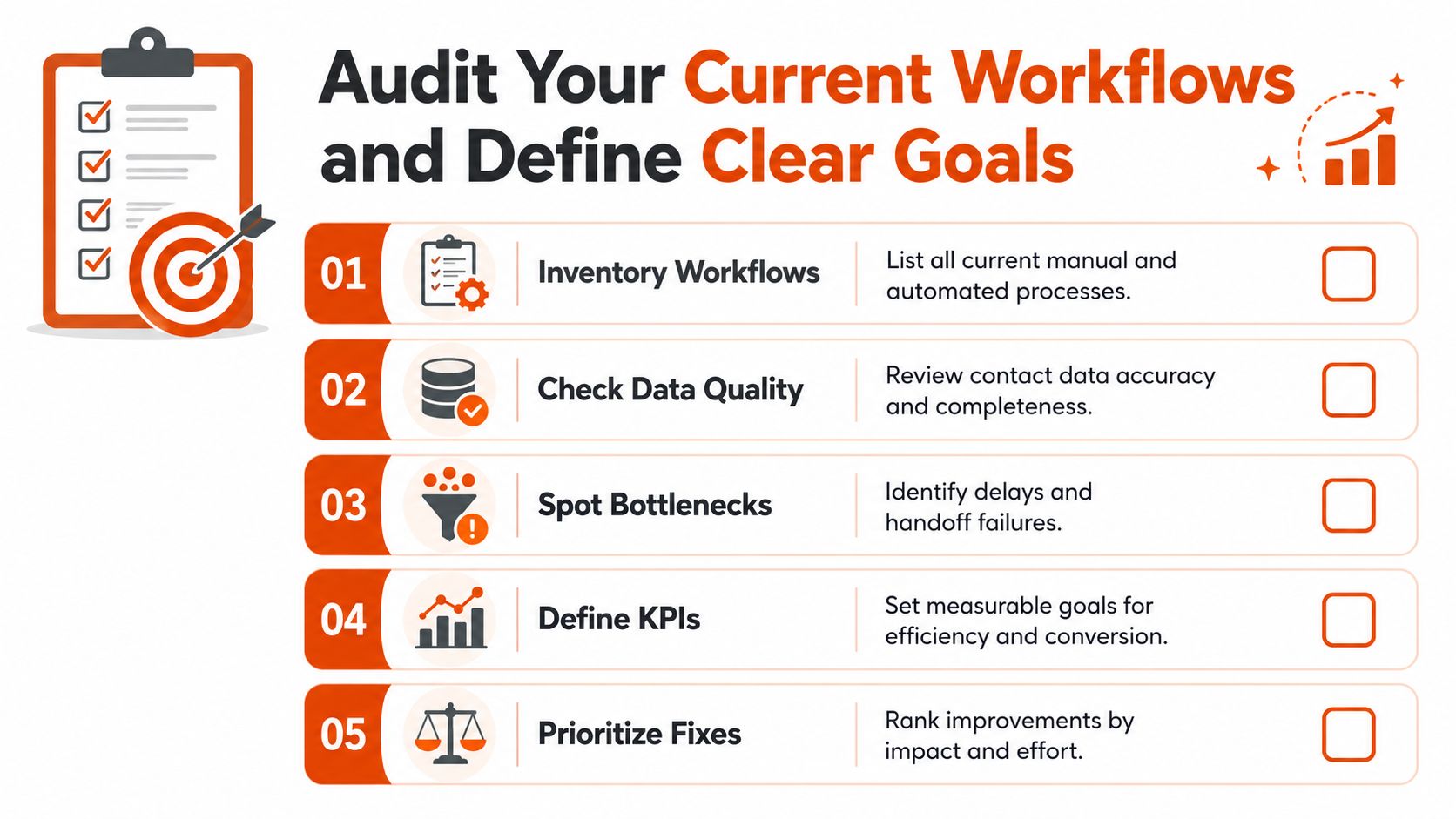
Audit Your Current Workflows and Define Clear Goals
A lead can enter your CRM immediately while the sales alert waits for someone to review a spreadsheet. That gap is the starting point for marketing workflow automation. Trace one live lead, campaign, or customer from entry to outcome, and document each system, person, field update, approval, and delay.
Build an evidence-based inventory
Create a workflow register that includes automated sequences and manual work across email, spreadsheets, project management tools, advertising platforms, and CRM views. For each workflow, record:
- Entry condition: Which event starts the process, such as a form submission, event attendance, product signup, or inactivity?
- Actions: Which messages, record updates, assignments, alerts, and tasks follow?
- Owner: Who maintains the logic, reviews exceptions, and approves changes?
- Handoff: When does responsibility move between marketing, sales, customer success, or operations?
- Failure state: What happens when a field is blank, a duplicate exists, an integration fails, or a team member leaves?
- Outcome: Which business result should the workflow influence?
Inspect the fields that control routing before designing new automation. Inconsistent lifecycle stages, incomplete industry data, and duplicate contact records can spread bad decisions through every connected workflow. Poor data quality can cost organizations an average of $12.9 million per year, according to the CRM workflow case study and data-quality guidance. Treat data hygiene as a technical control with an owner, validation rules, and an exception path.
Turn observations into operating goals
Set a baseline before changing the process. Track time to assign a lead, time to first response, the share of records routed without manual review, failed handoffs, campaign build effort, and rework caused by incorrect data.
Manual marketing workflows can take 8–12 hours per campaign to configure, while manual processes can delay lead response to 12–24 hours. Automated systems can respond in under five minutes, as described in the CRM workflow case study. Use one measurable goal that connects workflow performance to revenue, such as faster routing for high-intent inquiries or fewer manual checks before nurture enrollment.
The goal should also define the operating conditions. Name the owner, required fields, approval point, fallback action, and review date. A workflow without those controls is a temporary shortcut, not a reusable operating pattern.
Key takeaway: Don't automate a process until you can name its owner, entry condition, failure state, and business outcome.
Begin with one high-impact journey where the delay is visible and the result is measurable. Fix the handoff, validate the data, and document the pattern so it can be reused. Automation becomes an operating system through that cycle of audit, controlled rollout, monitoring, and adjustment.
Map Customer Journeys Into Automatable Workflows
A journey map becomes useful when it can be translated into executable logic. “Nurture qualified leads” isn't a workflow. A workflow defines the trigger, the data required to make a decision, the action taken, the owner responsible for exceptions, and the event that marks completion.
Start with one journey. Onboarding is often a strong candidate because the entry event is clear and the desired outcome is easy to describe. A new customer enters after a closed-won update, receives a welcome message, gets a task assigned to the implementation owner, and moves to a product education path based on activation behavior. If the customer doesn't complete the expected action, the system creates a human follow-up rather than sending endless reminders.
Translate stages into logic
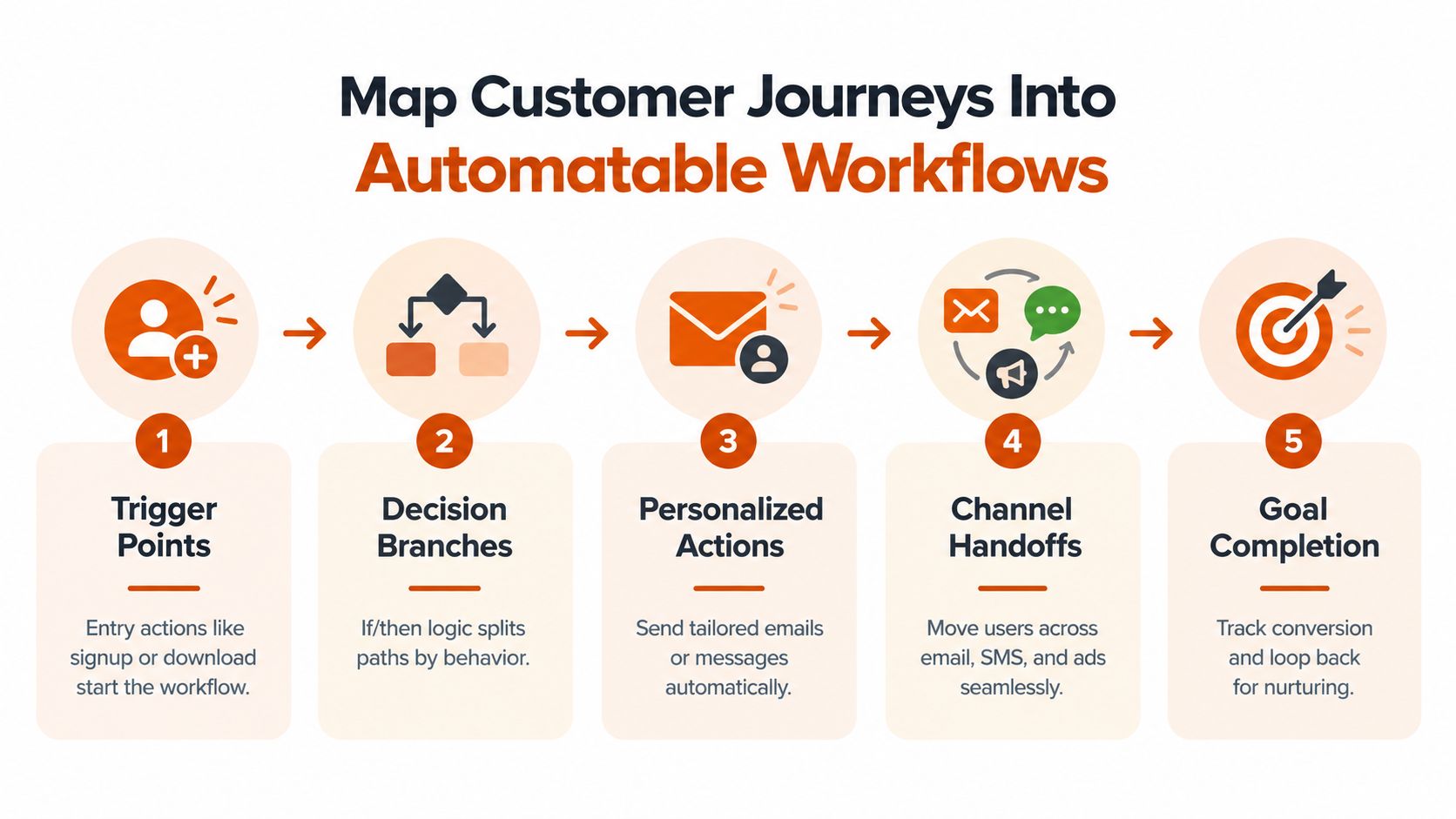
Map each stage using five components:
- Trigger points: Identify the event that starts or resumes the workflow. A signup, form submission, content download, product milestone, meeting booking, or period of inactivity can serve as an entry point.
- Decision branches: Define the fields and behaviors that change the path. A prospect who clicks a pricing message needs different treatment from one who only downloaded an introductory guide.
- Personalized actions: Specify the message, task, field update, or audience change that follows each branch. Personalization should reflect observed intent, not just merge fields.
- Channel handoffs: Decide when the contact moves between email, SMS, advertising audiences, CRM tasks, and sales alerts. Every handoff needs an owner and a failure response.
- Goal completion: Define the conversion event, suppression rule, or loop back into nurturing. A completed booking should remove a prospect from promotional follow-up immediately.
Behavior-based branching is usually more useful than a rigid time-based sequence. A fixed delay can be appropriate for a compliance notice or scheduled onboarding reminder, but it shouldn't dictate every next step when the customer is already signaling a different need.
Practical examples make the distinction clear. A re-engagement workflow can begin after inactivity, branch based on the person's response, and suppress future messages when the contact opts out. A lead-routing workflow can assign by territory, account ownership, or product interest, then send a task to sales only when required fields are present. A reporting workflow can alert an operations owner when cost per lead crosses an agreed threshold, instead of waiting for a weekly review.
Use customer journey orchestration as a design discipline, not a reason to force every interaction into software. Some touchpoints should remain partially manual because they require context, empathy, negotiation, or commercial judgment.
The strongest workflow blueprint includes the human decision before the team starts building.
Naming conventions, field definitions, suppression rules, and exception handling belong on the map. So do QA points. Test what happens when the contact already exists, a required field is empty, a prospect changes lifecycle stage, or a customer completes the goal before the next message is scheduled.
Select and Integrate Your CRM Marketing Automation and AI Stack
Tool selection should follow the audit and journey map. The right stack isn't the one with the longest feature list. It's the combination that can maintain identity, move trustworthy data, expose usable workflow logic, and support human intervention when the process reaches an exception.
A CRM should provide the system of record for accounts, contacts, ownership, lifecycle stages, opportunities, and activity history. Salesforce and HubSpot can support different operating models, while Microsoft Dynamics may fit organizations already standardized on Microsoft's broader business stack. The decision depends on data structure, sales process complexity, reporting needs, permissions, and the team's ability to administer the environment.
A marketing automation layer should handle audience selection, triggered communications, branching, suppression, campaign attribution, and campaign-level QA. Don't assume the CRM's native tools will cover every content, channel, or governance requirement. Conversely, don't add a separate platform when the existing system already handles the use case reliably.
An AI layer can help with classification, summarization, drafting, recommendations, and exception prioritization. It should operate within approved data boundaries and leave an audit trail for important decisions. AI that writes a message but can't explain why a person entered a sequence may increase operational risk rather than reduce it.
Choosing Your Automation Stack Components
| Stack Layer | Primary Job | Best Fit | Integration Watch-out |
|---|---|---|---|
| CRM | Own customer, account, ownership, and pipeline records | Teams needing a shared revenue system | Conflicting field definitions and duplicate identities |
| Marketing automation | Execute campaigns, nurture, segmentation, and triggers | Teams running repeatable customer journeys | Enrollment loops, suppression failures, and unclear lifecycle rules |
| Integration layer | Move data between systems and coordinate events | Businesses with multiple specialist tools | One-way syncs, delayed updates, and fragile connector dependencies |
| AI layer | Assist classification, content, analysis, and prioritization | Teams with high-volume repeatable decisions | Inaccurate outputs, weak permissions, and limited review controls |
| Analytics layer | Connect workflow activity to business outcomes | Leaders who need operational and revenue visibility | Inconsistent attribution and metrics that don't share definitions |
A practical integration test uses a behavioral trigger. A prospect visits a high-intent page, the marketing platform records the event, the CRM updates the contact activity, the routing logic checks account and ownership fields, and sales receives a task with useful context. If any step relies on a manual export, the design isn't fully integrated yet.
A disciplined CRM implementation strategy should define field ownership, permissions, sync direction, error handling, and rollback before launch. Start with a pilot that proves one measurable business outcome. Avoid overbuying AI or enterprise features before the core data flow works.
Content-heavy teams may also need specialized production capabilities. A resource on automated video repurposing can help evaluate how content transformation fits into the wider workflow without making the CRM responsible for every production task.
Build Test and Roll Out Reusable Automation Patterns
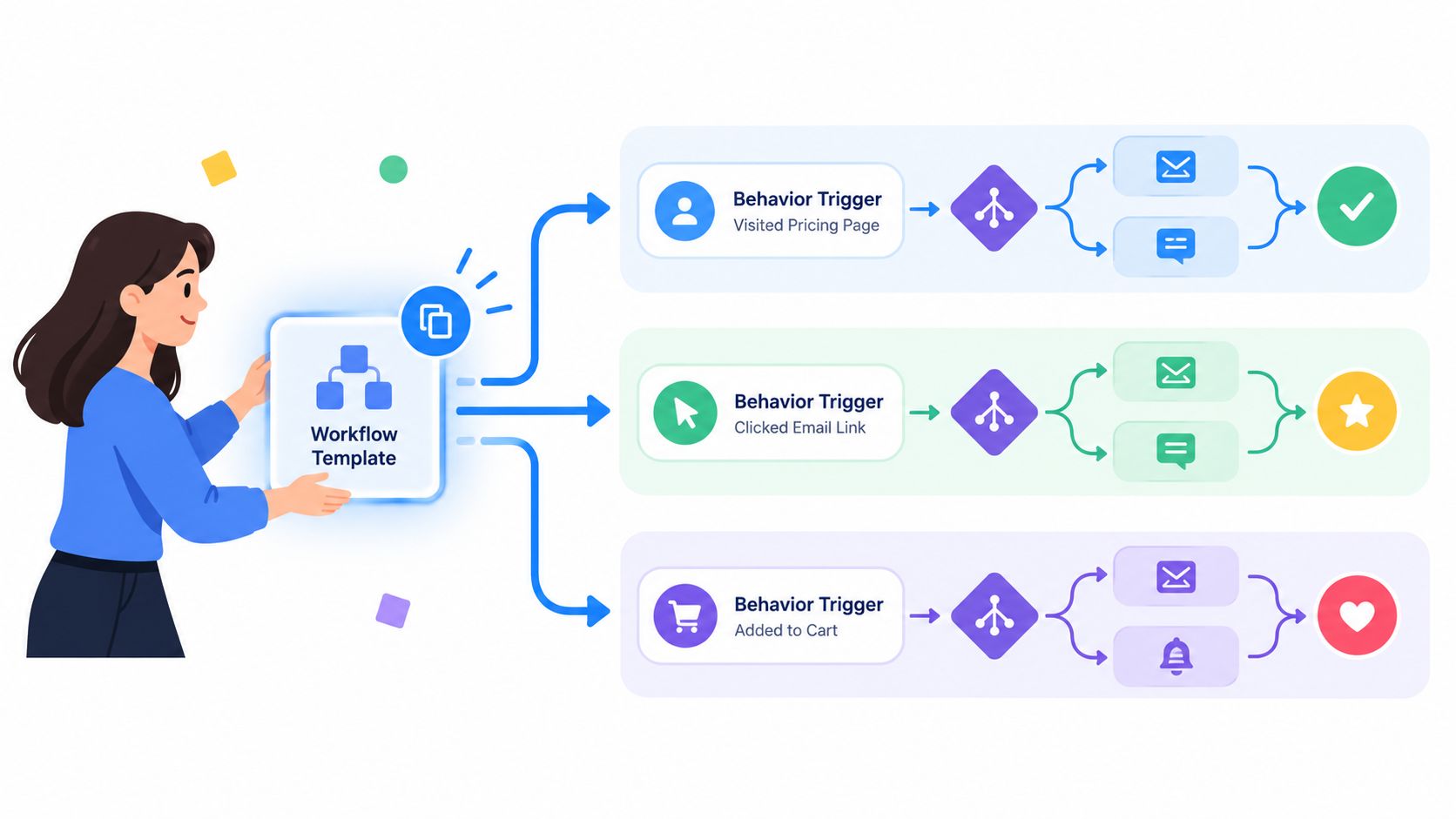
Build reusable patterns, not isolated campaigns that only one administrator can maintain. A standard workflow template should name each stage: trigger, qualification, action, wait condition, branch, handoff, suppression, completion, and error response.
Lead routing provides a practical starting pattern. A new or updated inquiry triggers the workflow. Qualification checks required fields and duplicate status, then routing applies account ownership or territory rules. The workflow creates a sales task with relevant context. Incomplete records go to operations for repair instead of disappearing in a queue.
Build for behavior and response speed
Use behavior signals when they improve relevance. A contact repeatedly viewing a product comparison needs a different sequence from someone who downloaded an introductory resource. Add suppression rules for booked meetings, closed opportunities, unsubscribes, and customer status before adding more messages.
Set a clear service-level agreement for response time. Manual processes can delay a response for 12–24 hours, while automation can respond in under five minutes, according to CRM workflow research and implementation guidance. The workflow should acknowledge the inquiry, capture context, and create a human task. A generic email starts the process, but it does not replace a meaningful sales conversation.
Test failure states before launch
Test with controlled records and inspect every branch. Include duplicate contacts, missing fields, conflicting ownership, unsubscribed contacts, completed goals, integration outages, and records that change status mid-sequence. Review the actual email, task, field update, and notification produced at each step.
A pre-flight checklist should cover:
- Entry testing: Confirm each trigger fires only under its intended conditions.
- Branch testing: Send test records through every meaningful behavior path.
- Suppression testing: Verify that customers, booked prospects, and unsubscribed contacts exit correctly.
- Handoff testing: Confirm the right owner receives a task with usable context.
- Reporting testing: Check that campaign and lifecycle values remain consistent.
- Rollback testing: Document how to pause the workflow and repair affected records.
Teams comparing no-code options can use Formbricks compares automation tools as one input. Interface simplicity still needs to be weighed against data control, permissions, and observability.
Roll out one journey first. Train marketing and sales on the workflow's purpose, limits, and exception paths. Once the pilot runs cleanly, package the pattern for onboarding, re-engagement, reporting alerts, and other journeys. Each reusable pattern should include its owner, test records, change history, and rollback steps, so adoption does not depend on the original builder.
Measure Govern and Scale Adoption for Lasting Impact
A workflow creates value only when the organization can see, trust, and maintain it. Measurement should connect operational performance to revenue outcomes without pretending that every conversion has a single cause.
Track the indicators that match the workflow's job. For lead routing, monitor assignment accuracy, response time, accepted leads, and sales follow-up. For nurture, examine progression, engagement quality, suppression accuracy, and pipeline movement. For reporting automation, measure data freshness, alert usefulness, and the time analysts no longer spend reconciling exports.
The broader adoption picture shows why governance matters. One 2026 roundup reports that 79% of marketers automate at least part of the customer journey, but only 10% are fully automated and 25% are mostly automated. It also reports that 21% do no customer-journey automation at all and 91% of organizations report rising demand for more automation, according to workflow automation examples and adoption data. These figures describe a common operating reality, teams have automation, but the system remains fragmented.
Govern the living system
Assign an owner for every production workflow. That person doesn't need to build every change, but they must approve logic changes, review failures, and coordinate with data and revenue operations. Maintain a workflow register with purpose, entry criteria, dependencies, owner, last review, and rollback instructions.
Run health checks on a regular operating cadence. Review field completeness, duplicate behavior, enrollment volume, branch distribution, suppressed records, failed actions, and sales feedback. Add alerts when a defined threshold changes materially, such as cost per lead exceeding the agreed limit or a routing queue accumulating unassigned records.
Only 9% of marketers run fully automated customer journeys, while 59% use partial automation, according to marketing automation adoption analysis. That isn't an argument for removing people from every process. It's a signal to identify which manual touchpoints represent necessary judgment and which merely compensate for weak integration, unclear ownership, or poor data.
The economic case also needs discipline. One 2026 market summary reports an average return of $5.44 for every $1 invested, while top-performing email workflows generated $16.96 in revenue per recipient compared with $1.94 for average flows, as reported in 2026 marketing automation statistics. Treat these as market-level reference points, not a forecast for your business. Your own baseline, attribution model, costs, and workflow quality determine whether the investment pays back.
Key takeaway: Scale the pattern only after the data, ownership, exception path, and measurement all work in production.
The impact opportunity sits between partial automation and orchestration. Convert repeated handoffs into governed events, keep judgment where it creates value, and make every workflow observable enough to improve.
Prometheus Agency helps growth leaders turn existing CRM and marketing tools into governed revenue workflows, from audit and architecture through implementation, AI enablement, adoption, and ongoing optimization. Visit Prometheus Agency to request a complimentary Growth Audit and AI strategy session focused on the workflows creating the most friction today.