A lot of teams are in the same spot right now. The CRM looks healthy from a distance, sales has thousands of contacts, and dashboards still populate, but the moment a rep prepares for a call the cracks show. A headcount is outdated. The champion changed roles months ago. A routing rule sends a strategic account to the wrong segment because company size never got refreshed.
That's where CRM data enrichment stops being a cleanup task and starts becoming a revenue decision. If a field influences routing, scoring, segmentation, or outreach, it needs an operating model. If it doesn't influence a decision, enriching it just adds cost, noise, and trust issues.
What CRM Data Enrichment Really Means in 2026
An AE walks into a renewal call believing the customer still has the same team shape as last year. They reference an old headcount, frame expansion around the wrong use case, and the buyer notices immediately. Meanwhile, a competitor shows up with current context, the right org assumptions, and cleaner account notes. That loss usually gets blamed on “execution.” Often it's a data maintenance failure.
CRM data enrichment in 2026 means continuously augmenting, correcting, and refreshing records inside systems like Salesforce, HubSpot, or Dynamics using external providers, first-party signals, and AI-supported inference. It isn't a one-time import. It isn't a quarterly spreadsheet project either.
A Field Only Matters If Someone Uses It
The mistake I see most often is treating coverage as the goal. It isn't. The goal is better decisions.
A field deserves enrichment when it answers a live downstream question such as:
- Routing: Should this account go to enterprise, mid-market, or commercial?
- Scoring: Does this contact match ICP and buying committee criteria?
- Segmentation: Should marketing place this record into an industry, region, or lifecycle motion?
- Personalization: Does a rep have enough context to write a relevant first touch or renewal email?
If a field doesn't support one of those actions, it's usually not worth paying to enrich at scale.
Practical rule: Don't buy “more data.” Buy fewer, better fields that change decisions inside one business day.
Why the maintenance framing matters
The maintenance view changes how teams design the program. Instead of asking, “How do we fill missing fields?” ask, “Which records need to stay trustworthy for revenue workflows to work?”
That difference affects everything:
- Field selection
- Cadence
- Overwrite rules
- Vendor choice
- Rep trust
A contact record with a valid work email and accurate company size may be operationally useful even if ten other fields remain blank. A record with broad coverage but stale titles and duplicate phone numbers can still break sales execution.
Key Takeaways
- CRM data enrichment is an ongoing operating discipline, not a one-time append.
- Every enriched field should map to a decision, not a vanity completeness target.
- Trust beats volume. Sales teams use data they believe, and ignore data they don't.
Why Growth Leaders Are Treating Data Quality as a Revenue Problem
The economics are hard to ignore. B2B contact data used in enrichment decays at about 30% per year, which means roughly one-third of records can become stale annually if they aren't refreshed, according to Enrich CRM data benchmarks. That's why enrichment belongs in the revenue stack, not just the ops backlog.
Independent reporting makes the impact even clearer. 76% of organizations said less than half of their CRM data is accurate and complete, and 37% of CRM users reported direct revenue losses tied to poor data quality. The same reporting cites an annual cost of poor data quality at $12.9 million per organization. On the market side, data enrichment solutions were valued at $2.25 billion in 2025 and are projected to reach $3.94 billion by 2032 at an 8.3% CAGR, while another forecast says the market will reach $4.58 billion by 2030, based on industry reporting on CRM data enrichment trends and costs.
Cost of Bad CRM Data at a Glance
| Metric | Value | Revenue Implication |
|---|---|---|
| CRM data accuracy and completeness | 76% of organizations said less than half is accurate and complete | Scoring, routing, and forecasting start from weak inputs |
| Revenue loss from poor data quality | 37% of CRM users reported direct revenue losses | Bad records suppress conversion and waste rep time |
| Annual cost of poor data quality | $12.9 million per organization | Data quality moves from admin issue to budget issue |
| Data enrichment market size | $2.25 billion in 2025 | Buyers are funding enrichment like core infrastructure |
| Projected market growth | $3.94 billion by 2032 at 8.3% CAGR | Growth leaders expect this category to persist |
| Alternate market projection | $4.58 billion by 2030 | Vendor competition will keep increasing |
What this means for a VP of Growth
When data quality slips, pipeline math slips with it. Lead scoring gets noisier. CAC payback analysis gets less reliable. Forecast reviews become arguments about inputs instead of decisions about action.
That's also why enrichment broke out from basic CRM feature sets and became its own buying category. Teams now expect more than append-only lookups. They want waterfall matching, verification layers, duplicate controls, and workflows that repair records continuously.
A strong starting point is tightening your broader data hygiene best practices before you add more sources. Enrichment amplifies whatever operating discipline already exists. If governance is weak, the extra data just spreads the mess faster.
Poor CRM data doesn't stay contained in the CRM. It shows up in missed meetings, misrouted accounts, weak forecasts, and rep skepticism.
Impact opportunity
The upside isn't “more complete records.” The upside is operational. Better routing puts the right rep on the right account sooner. Better scoring reduces wasted follow-up. Better firmographics improve segmentation and territory decisions. Those are revenue levers.
Enrichment Methods and Data Sources Worth Knowing
A rep opens a new inbound account five minutes before the routing SLA expires. The domain is there, but employee count is missing, industry is inconsistent across two systems, and the contact title is written three different ways. At that point, “enrichment” is not a data project. It is a revenue decision about which missing fields need to be trustworthy enough to drive assignment, scoring, or outreach.
That is the frame that matters. Enrich fields because a downstream workflow depends on them. Leave the rest alone until there is a real use case.
First-party capture
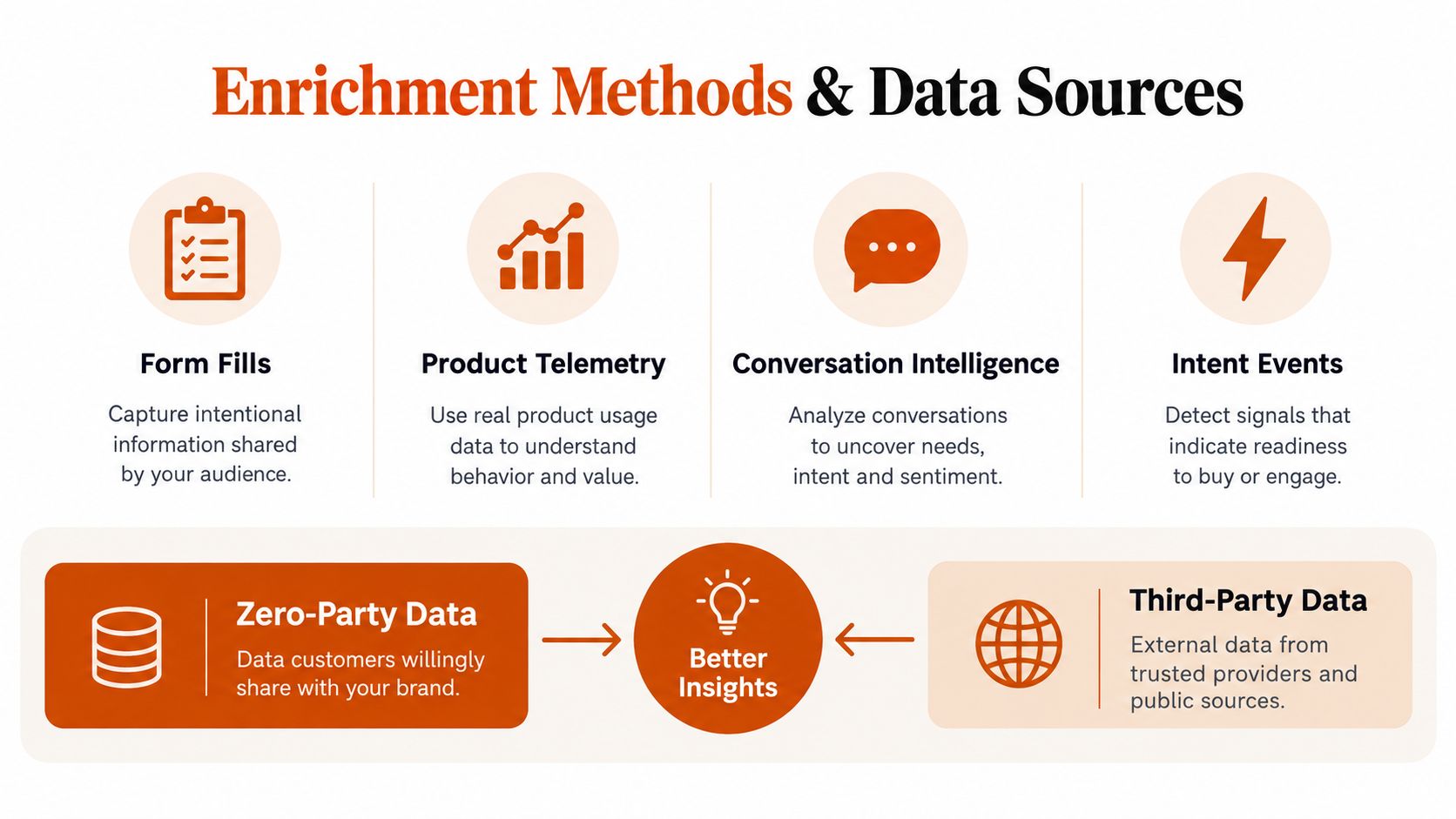
First-party data should win whenever the field reflects something the buyer told you or did with your company. That includes form inputs, product usage, sales call notes, conversation intelligence, and intent signals you collected directly.
In practice, I treat these fields as highest trust but not always highest consistency. A prospect may self-report company size on a form in a way that helps routing but does not match legal entity headcount later. That is fine if the immediate decision is territory assignment and the acceptable error rate is low enough to absorb some mismatch.
Use first-party capture for fields tied to:
- routing based on declared segment
- lifecycle stage or expansion potential based on product behavior
- active buying signals from conversations or engagement history
If the field exists to reflect customer behavior, third-party append is usually the wrong source.
Third-party append
Third-party providers are useful for coverage gaps, especially for firmographics, technographics, work email, phone, and company normalization. The mistake is treating every appended field as equally reliable. They are not.
At mid-market B2B firms, the best results usually come from limiting third-party enrichment to fields with a clear operational job. Common examples are standardizing industry for segmentation, filling company size bands for routing, or adding contact details for sales development. Job title, direct dial, and reported employee count can all be helpful. They also drift, conflict, or arrive without enough context to trust blindly.
A simple rule works well here. If a field will trigger an immediate action, set a higher bar before you let appended data write into the CRM. If a field supports reporting or list building, a lower confidence threshold may be acceptable.
Append third-party data when it saves manual research or improves a specific workflow. Do not buy blanket coverage and assume every new field deserves a place in the system of record.
Teams often pair this with outbound execution. If enriched fields feed prospecting and sequencing, this guide on how to automate outreach is a practical companion because it shows how field-level enrichment turns into actual campaign logic.
Waterfall enrichment
Single-provider enrichment usually looks good in a sales demo and weaker in your actual database. Subsidiaries, regional entities, founder-led firms, and niche verticals expose the gaps fast.
Waterfall enrichment checks multiple sources in sequence and stops when a field meets your match standard. The value is not “more data.” The value is better odds of filling the few fields that matter. For many teams, that means company match, website, employee band, industry, and one reachable work contact. After the second or third provider, gains often flatten while costs, conflict rates, and troubleshooting time keep rising.
That trade-off deserves active management. If provider three adds marginal coverage but doubles review effort on conflicting employee counts, it is probably not helping revenue operations.
After you've defined the methods, it helps to see the operational side in motion:
AI-assisted enrichment
AI works best as a support layer, not a free pass to overwrite trusted records. It is useful for extracting structure from messy notes, grouping inconsistent values, and inferring broad categories when the CRM needs normalization more than precision.
Good use cases include:
- inferring broad industry buckets from company descriptions
- standardizing seniority and function labels
- extracting structured fields from notes, transcripts, or email signatures
The weak use case is obvious. Do not let AI inference make hard routing or scoring decisions unless you have a verification step behind it.
That is the larger pattern across every method here. Enrichment is a maintenance discipline. The job is not to fill every blank. The job is to keep the specific fields that affect revenue decisions current enough, trustworthy enough, and cheap enough to maintain.
Choosing Triggers and Cadence for Your Stack
The operating rhythm matters as much as the data source. A field that blocks assignment should be enriched differently from a field that supports next month's segmentation project.
Industry guidance on CRM hygiene recommends enriching new records at creation or in daily batches, re-enriching existing records quarterly, and monitoring dashboards with targets such as 95%+ completeness for new records, 85%+ for historical records, and under 3% duplicate rate, according to the CRM data hygiene playbook.
Enrichment triggers and cadences compared
| Cadence | Trigger | Latency | Best-fit Fields | Trade-off |
|---|---|---|---|---|
| Real-time on create | Form submit, inbound lead, manual record creation | Seconds to minutes | Email validation, company match, routing firmographics | Highest immediacy, higher workflow complexity |
| Batch | Nightly or daily job | Hours | Normalization, account segmentation fields, imported list cleanup | Efficient at scale, not ideal for immediate routing |
| Quarterly re-enrichment | Scheduled refresh of existing records | Days across full database | Company size, industry, contact role, phone | Best for decay control, weaker for urgent actions |
A simple decision rule
Use real-time enrichment when the field affects a downstream action in minutes. Territory assignment is the classic example.
Use batch enrichment when the field shapes segmentation or list usability, but doesn't block immediate action. This is common after webinar imports, trade show uploads, or partner-sourced lists.
Use quarterly re-enrichment when the field drifts materially over time and sales still depends on it. Account data doesn't stay frozen just because the CRM imported it once.
What works in practice
The most stable operating model is usually mixed. Validate and enrich critical fields on create, clean up the residue in batch, and refresh important historical records on a fixed cadence. Teams that insist on one universal rhythm usually overpay, or let stale records pile up.
Inside the CRM Workflow and Architecture Decisions
A practical CRM data enrichment workflow starts inside the system reps already use. In HubSpot, for example, the data quality workflow includes scanning for gaps and reviewing the Enrichment Coverage section, where match rate is defined as the percentage of records eligible for enrichment. HubSpot also includes duplicate alerts with a daily limit, which makes enrichment a workflow behavior rather than a one-time import, as shown in HubSpot's data quality tools documentation.
A grounded workflow example
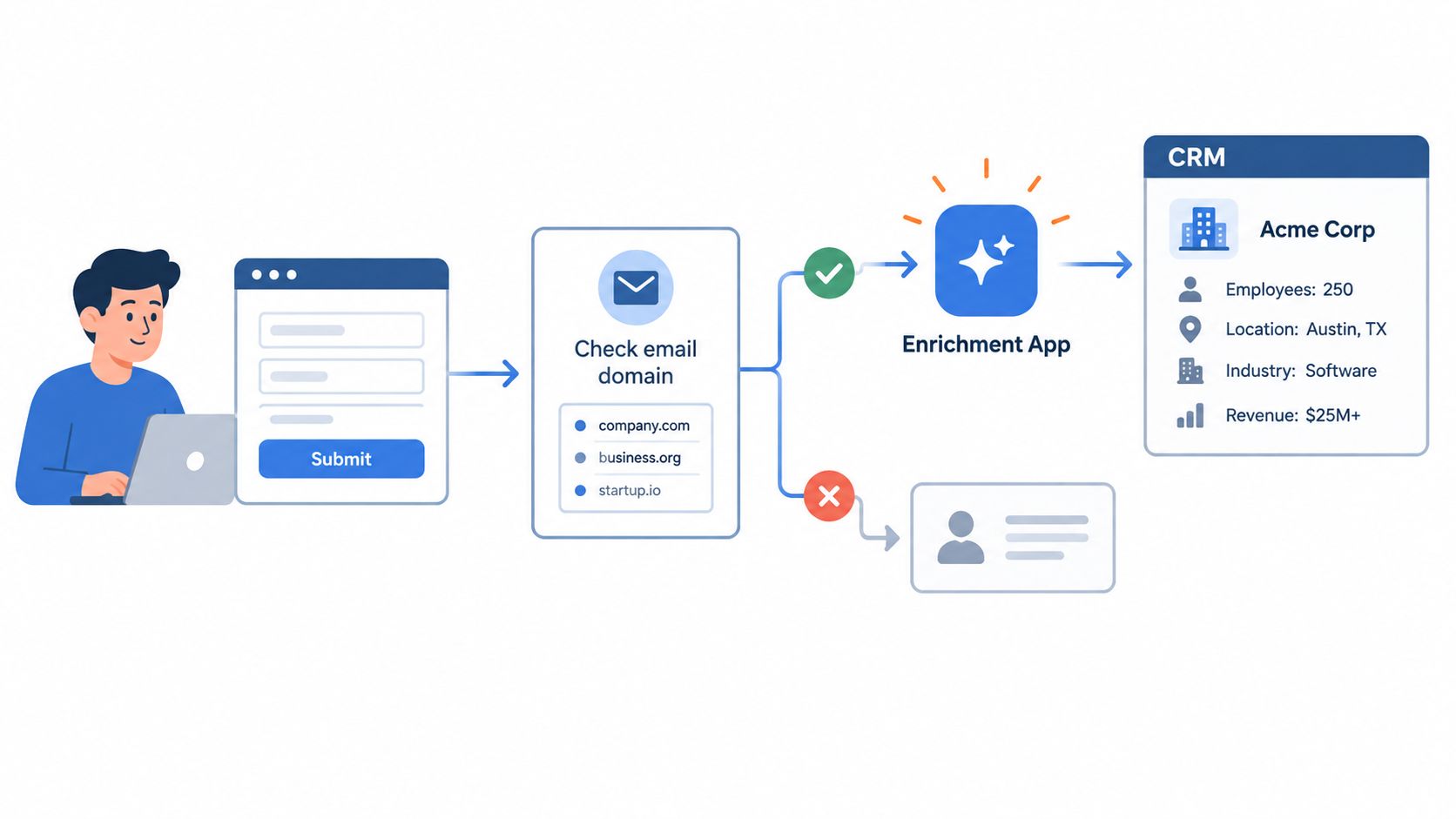
A new contact enters through a form. The workflow checks the email domain against known customers and blocked domains. If it passes, an enrichment app looks up firmographics, writes results to mapped properties, and routes the record based on company size or account ownership rules.
That process looks simple on a whiteboard. Design choices sit underneath it.
Three architecture choices that matter
Where fields live
Don't write third-party values directly into source-of-truth fields unless you've decided the overwrite policy in advance. Many teams keep:
- Native operational fields for trusted values reps act on
- Custom enrichment fields for provider-returned values
- Metadata fields for source, refresh date, and confidence
That structure makes exception handling easier and reduces rep confusion.
How providers are sequenced
Single-vendor setups are easier to manage. Waterfalls improve coverage. Hybrid models often work best. One provider may handle account-level firmographics well, while another is stronger on contact phones or regional coverage.
If you're still early, even a lightweight B2B sales tracking tool mindset can help clarify which fields your team acts on before you hardwire a more complex architecture into the CRM.
How sales sees the data
Reps need clarity, not field sprawl. If the sidebar shows three competing company sizes and two titles, they'll ignore all of it. Surface the active field, the last refresh date, and the source confidence in a way they can understand quickly.
Field priority rule
Enrich first whatever feeds scoring, routing, or personalization within 24 hours. Everything else waits until it earns a business case.
That's also where options such as HubSpot-native apps, middleware connectors, and providers like ZoomInfo, Apollo, Clearbit, or operational partners such as Prometheus Agency fit in. The useful question isn't which tool has the biggest catalog. It's which setup writes the right fields back into the CRM, with enough trust for sales to use them.
Governance Consent and Trust as Part of the Program
Governance belongs inside CRM data enrichment from day one. Teams that bolt it on later usually discover two problems at once. Legal doesn't like the append logic, and sales no longer trusts the records.
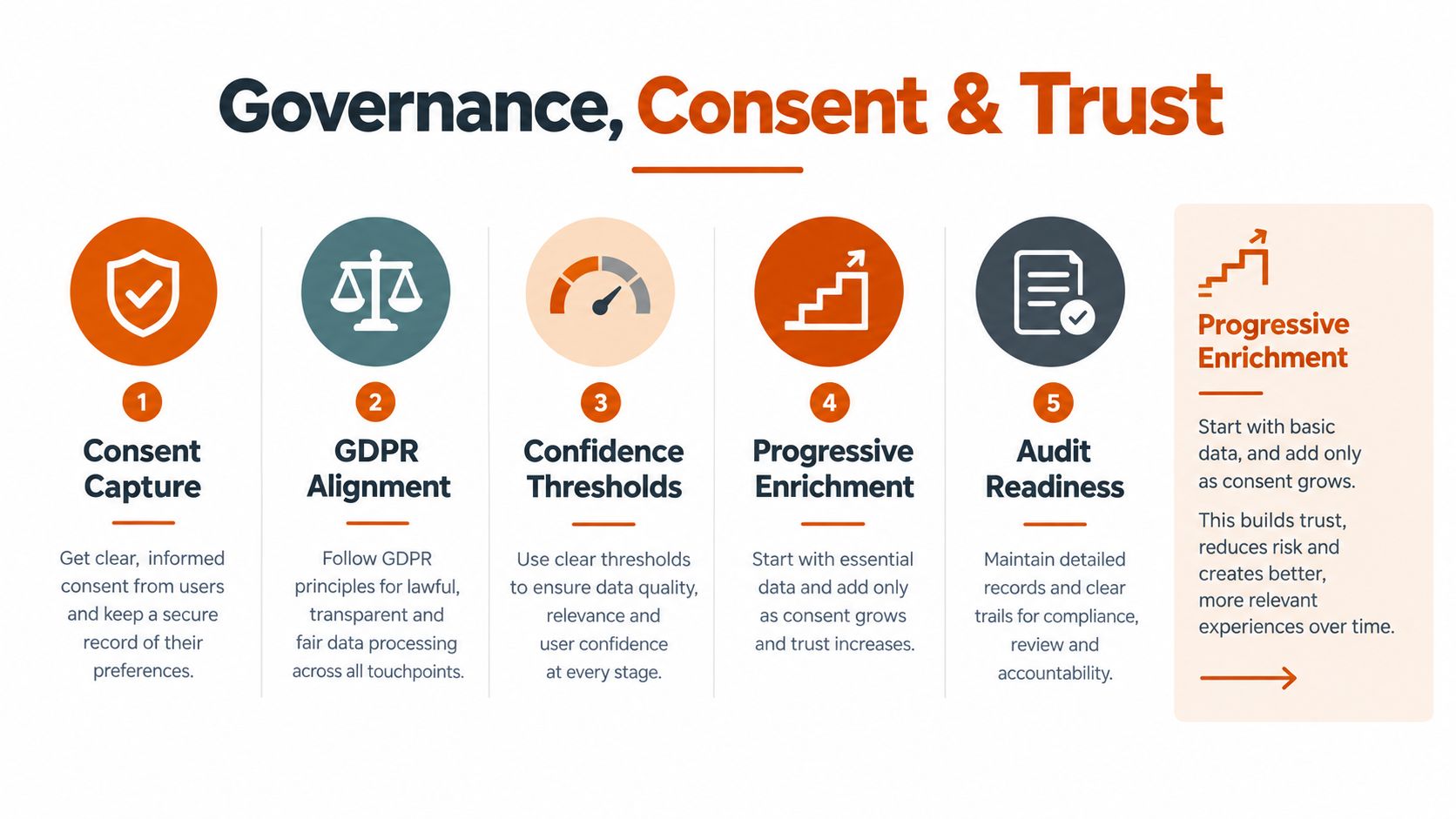
Recent guidance on progressive enrichment argues for a tighter model: identify high-usage fields with low completion first, avoid spending on fields that are already sufficient, and treat consent logging, audit trails, DPAs, opt-out propagation, and source confidence thresholds as part of the enrichment program itself, based on guidance on progressive data enrichment and governance.
Consent needs records, not assumptions
A GDPR-focused guide notes that enrichment of professional contact data can usually be done under legitimate interest for B2B use cases, but when consent is used it must be specific and recorded with proof of who consented, when, to what wording, and through which form. It also says enrichment must stay within the categories named in that consent, according to this GDPR guide for data enrichment.
That has direct CRM implications. The record should store consent status, capture source, and suppression logic alongside the enrichment flow.
What trust looks like operationally
High-trust programs usually share the same traits:
- They append progressively: start with fields a contact would reasonably expect you to know
- They log provenance: provider, timestamp, and confidence travel with the value
- They suppress properly: opt-outs and consent withdrawals stop future appends
- They define overwrite logic: first-party values don't get replaced casually
For teams using AI in data operations, this broader AI data governance framework is a useful lens because it ties compliance, model behavior, and operational controls together.
The fastest way to kill adoption is to enrich aggressively and force reps to guess which value is real.
Implementation Roadmap KPIs and Vendor Evaluation
A rollout usually goes sideways in a familiar way. The team buys credits for broad coverage, pushes third-party values into live fields, and only then asks which values sales will trust enough to use for routing, scoring, or outreach. A better implementation starts with a narrower question. Which fields are tied to revenue decisions strongly enough to justify ongoing enrichment, review, and refresh?
That question should shape the roadmap, the KPI set, and the vendor shortlist.
A practical 90-day rollout
Weeks 1 and 2: audit field usage and decay. Pull reports on the fields used in lead scoring, account assignment, territory rules, segmentation, and sequence entry. Ignore low-use fields for now. If a field does not drive a decision, it should not be first in line for enrichment.
Weeks 3 and 4: set policy before any large write-back. Define which source wins when first-party and third-party values conflict, which fields can be auto-updated, which ones require review, and what confidence level is high enough to write into production. Map ownership across RevOps, marketing ops, and SDR leadership so disputes do not sit unresolved in Slack threads.
Weeks 5 through 8: run a pilot on one object and a small set of fields. Account records are often the safer starting point because company size, industry, and account status tend to affect routing and prioritization faster than broad contact appends. Use operational thresholds that keep the pilot honest. The CRM data quality report is a useful reference for targets such as high email validity, low duplicate rates, strong completion on revenue-driving fields, and bounce rates low enough to protect outbound performance.
Weeks 9 through 12: move from pilot to operating rhythm. Turn on the triggers, publish the dashboard, and write vendor review terms into the process. If results only hold up when one operator checks every batch by hand, the program is still fragile.
Vendor Evaluation Scorecard for CRM Data Enrichment Tools
| Criterion | What to ask the vendor | Weight |
|---|---|---|
| Data provenance | Where does each field come from, and can source metadata be stored in the CRM record? | High |
| Freshness | How often is each field type refreshed, and can stale values be flagged before they affect workflows? | High |
| Compliance posture | How are DPAs, opt-outs, suppression rules, and regional restrictions handled? | High |
| Match logic | How do you measure match rate, validity, and actual deliverability after enrichment? | High |
| CRM-native depth | Do you support direct write-back, field mapping, and bidirectional sync without custom work? | Medium |
| Conflict handling | What rules exist for competing values across providers or against first-party inputs? | Medium |
| Cost model | What will this cost at our real record volume and refresh cadence, not at the sample tier? | Medium |
| Workflow fit | Can the product support real-time, scheduled, and batch enrichment for different field types? | Medium |
How to evaluate accuracy without fooling yourself
Do not let vendors test on a handpicked list of ideal records. Use a stratified sample from your own CRM, split by segment, record age, geography, and object type. Then score the results field by field against independent validation and manual review where needed.
I usually want three questions answered in that test. How often did the vendor return a value, how often was the value correct, and should that field be trusted enough to write into a workflow-driving property? Coverage without trust creates more work than it saves.
A second check is whether the rest of your stack can clean up what enrichment introduces. Teams that plan only for append tend to miss normalization, duplicate review, and exception handling. This guide to AI for CRM data cleanup is useful if you need to evaluate what happens after new values land.
KPIs that matter
Track quality metrics and business-use metrics together. If you only watch match rates, you can miss whether the data changed any decision.
- Coverage on fields tied to scoring, routing, segmentation, or outbound entry
- Validity and deliverability for enriched contact data
- Duplicate suppression rates after write-back
- Freshness by field type at 30, 60, and 90 days
- Cost per usable enriched record
- Pipeline influence from enriched accounts or contacts
One rule helps here. Do not average every field into one health score. Firmographic completion, contactability, and routing accuracy decay at different speeds and deserve separate thresholds.
Practical examples
A strong pilot often starts with account enrichment, not full contact coverage. Mid-market teams usually get earlier value from improving company size, industry, parent-child relationships, and territory fields because those values affect assignment and prioritization right away.
Contact enrichment can come next, but it needs tighter controls. Job title, direct phone, and LinkedIn URL may help outbound teams, yet each field carries a different trust threshold and refresh cadence. That is the larger discipline. Enrich the fields that earn their place in a revenue decision, then maintain them on purpose.
Pitfalls and Practical Examples from the Field
The most expensive enrichment mistakes usually come from overreach, not underinvestment.
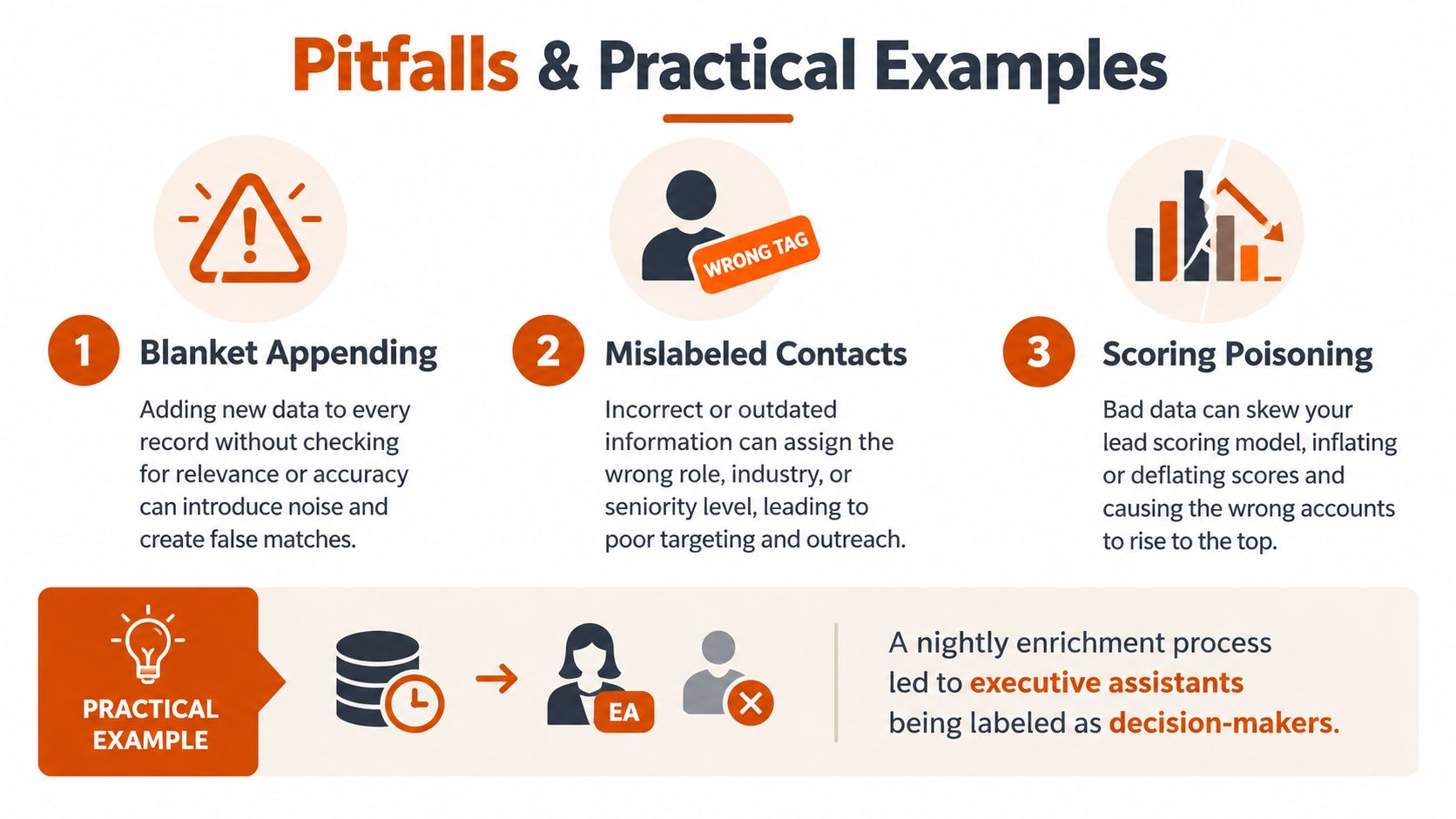
One pattern shows up repeatedly. A team enriches every contact on an aggressive schedule, writes third-party values directly into live fields, and poisons the scoring model. Executive assistants get labeled as decision-makers. Old records reappear with “fresh” but conflicting data. SDRs stop trusting the CRM and fall back to manual research.
Three recurring failures
Blanket appending
This happens when teams buy broad coverage before they decide which fields matter. The result is extra spend, noisy records, and low rep confidence.
Ignoring decay
Enrich-on-create sounds efficient until months pass and no one refreshes the important fields. The CRM starts with good intent and ends with stale routing and weak segmentation.
Treating enrichment as a project
Projects have end dates. Maintenance disciplines have owners, cadences, dashboards, and review loops. CRM data enrichment belongs in the second category.
If nobody owns data freshness after launch, the system is already decaying.
Five-item checklist
- Audit before you append: identify high-usage, low-completion fields first
- Set field-level confidence rules: not every field deserves the same overwrite policy
- Define decay cadence by data type: account, contact, and intent data age differently
- Assign one owner per object: someone should own accounts, contacts, and exception review
- Review enrichment logs monthly: look for conflicts, bad writes, bounce risk, and duplicate drift
Impact opportunity
The teams that get the most from CRM data enrichment don't chase maximum coverage. They protect decision quality. That means fewer enriched fields, better workflows, clearer ownership, and data sales will use.
Prometheus Agency helps growth teams turn CRM data enrichment into an operating system instead of a one-off cleanup. That includes field audits, workflow design, enrichment automation, and the governance controls needed to keep routing, scoring, and outreach trustworthy over time. If you want a practical roadmap tied to revenue execution, visit Prometheus Agency.