Your engineering team has a familiar problem. Product wants a revenue-critical workflow shipped quickly, developers are moving between UI changes and large refactors, and leadership is deciding whether to standardize on an AI coding tool. One group prefers an editor where every change is visible. Another wants an agent that can take a multi-step task, run commands, update files, and return with a tested result.
That disagreement isn't really about which interface looks better. Claude Code vs Cursor is an operating-model decision. It affects who controls each change, how reviewers work, how junior and senior developers adopt AI, and whether your organization can apply consistent guardrails across the software development lifecycle.
Introduction Why This Comparison Matters Now
Cursor launched in 2023 as an AI-first VS Code fork, while Claude Code shipped in May 2025 as a terminal-native agent built on Anthropic models. The difference reflects a rapid market shift from AI assistance inside the editor toward more autonomous agent workflows, as described in this independent comparison of Cursor and Claude Code.
A B2B growth leader should care because coding work rarely stays inside one narrow category. A team might adjust a CRM integration in the morning, repair a broken lead-routing rule after lunch, and prepare a multi-file migration before the next release. The right tool changes with the shape of the work.
Cursor behaves like an AI pair programmer embedded in the editor. Developers can inspect suggestions, review visual diffs, guide the model file by file, and keep a tight feedback loop during interface or feature work. Claude Code behaves more like an autonomous terminal agent. A developer gives it an outcome, and it can inspect the repository, edit multiple files, run commands, execute tests, and iterate with less supervision.
That distinction creates different governance needs. Cursor makes approval points visible, but developers can still accept suggestions too quickly. Claude Code can reduce repetitive coordination, but teams need stronger branch discipline, task boundaries, test requirements, and review ownership.
This guide evaluates both products across:
- Developer experience, including visual editing and terminal interaction
- Code quality, including first-pass accuracy and task-specific outcomes
- Workflow control, autonomy, and review discipline
- Integration and deployment, especially for existing B2B systems
- Security and enterprise readiness, including standardization and accountability
- Pricing and workload economics, not just subscription labels
Key Takeaways: Choose Cursor when developers need rapid, visible, interactive editing. Choose Claude Code when the work involves multi-file changes, documentation, refactors, or delegated execution. Use a hybrid model when your backlog contains both categories, but govern the tools as distinct workflows rather than giving everyone unrestricted access.
By the end, you'll be able to decide which operating model fits your team, where the impact opportunity sits, and how to run a controlled pilot without turning AI adoption into an open-ended tooling experiment.
Understanding Claude Code and Cursor at a Glance
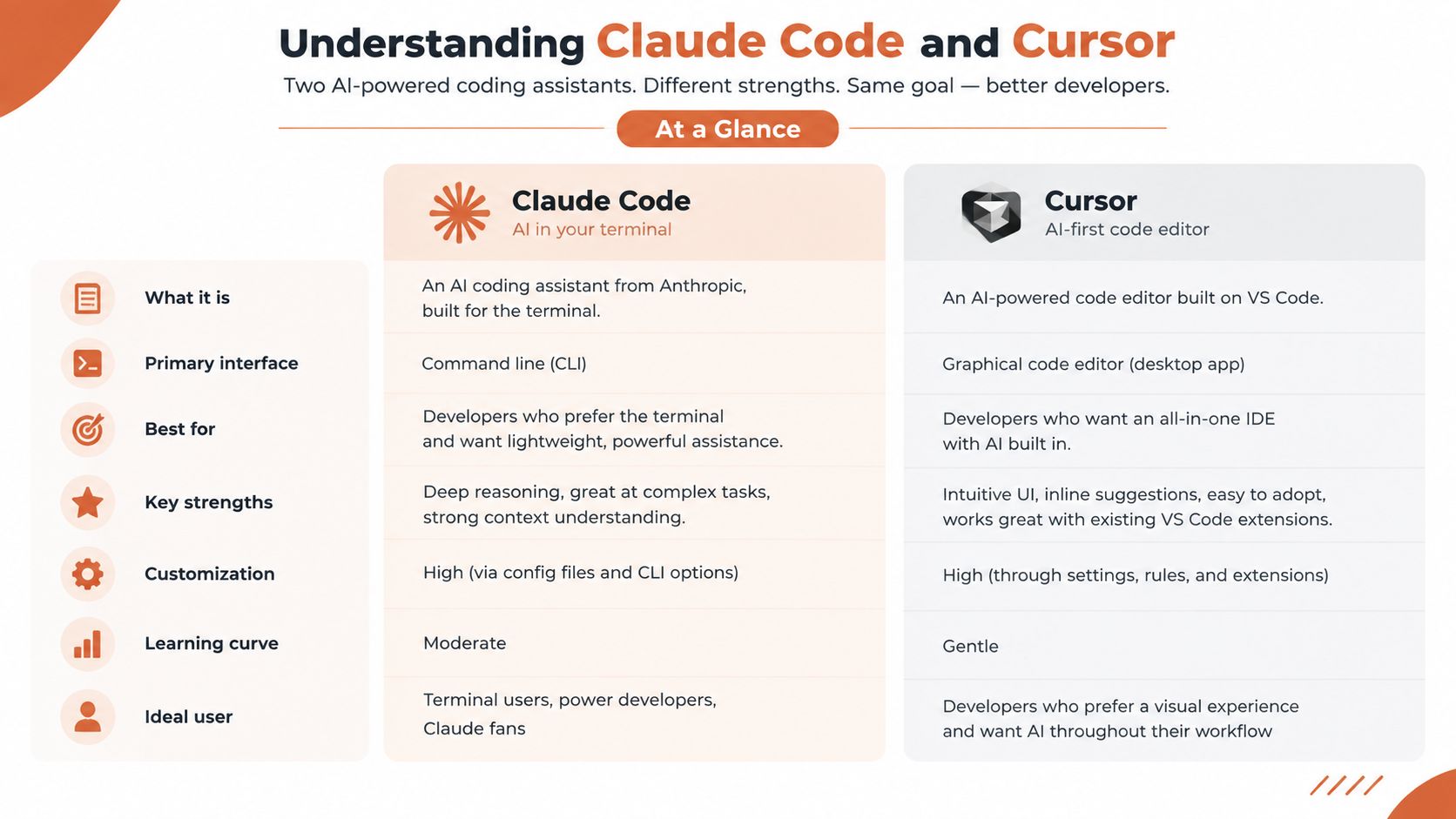
Cursor and Claude Code overlap in capability, but they start from different assumptions about how developers should work.
Cursor is an AI-first desktop editor built as a fork of VS Code. Its core experience keeps the developer inside a familiar visual environment. A developer opens a repository, moves through the file tree, asks for an inline edit, reviews the proposed diff, and accepts or rejects the change. Cursor also supports broader agent-style edits, but the interaction remains centered on the editor.
Claude Code is a terminal-native coding agent. A developer works inside the project directory, describes a goal in natural language, and lets the agent inspect files, modify code, run shell commands, execute tests, and respond to failures. The developer's primary job shifts from directing individual edits to defining the outcome and reviewing the resulting work.
Two interaction models
A developer using Cursor might write a component, ask the tool to adjust the validation message, inspect the diff, and accept the change within the same editor session. That workflow suits design-system adjustments, copy changes, small feature enhancements, and debugging where visual feedback matters.
A developer using Claude Code might ask the agent to update an API contract across the application, revise related tests, run the test suite, and summarize unresolved failures. That workflow suits repetitive changes that span files or require several connected actions.
The distinction matters for mixed-skill teams. Less experienced developers often benefit from visible diffs and familiar navigation. More experienced developers may gain more from delegating a well-defined repository task and reviewing the agent's plan, changes, and test output.
Teams building command-line workflows can also use practical resources such as this CLI setup guide for Amazon sellers to understand how terminal-based interaction fits into operational processes. The broader lesson is that a terminal agent introduces a different working habit, not just another chat panel.
Cursor's 2023 origin and Claude Code's May 2025 release also explain why their design goals diverge. Cursor grew from the IDE outward. Claude Code emerged from the agent and terminal inward. As a result, Cursor prioritizes moment-to-moment control, while Claude Code prioritizes autonomous execution over longer task sequences.
Detailed Comparison Across Core Evaluation Criteria
The practical question isn't whether either tool can generate code. Both can. The question is where human attention creates the most value.
| Criteria | Claude Code | Cursor |
|---|---|---|
| Primary workflow | Terminal-native autonomous execution | IDE-first interactive editing |
| Developer experience | Goal-based delegation across project files | Visual, file-aware pair programming |
| Best operating mode | Long-running, multi-step tasks | Rapid edits and continuous feedback |
| Review model | Human reviews plans, diffs, tests, and command outcomes | Human reviews proposed changes directly in the editor |
| Model approach | Anthropic models | Multi-model support |
| Visual workflow | Less central to the experience | Core strength through editor context and visual diffs |
| Adoption profile | Better for teams comfortable with terminal workflows | Easier for teams already using VS Code-style editors |
| Standardization impact | Strong for repeatable task execution | Strong for controlled, interactive development |
Developer experience and workflow control
Cursor keeps the developer close to the code. That reduces friction when the work involves small decisions, visual layout, or frequent reversals. The developer can select context, inspect a suggested change, and continue editing without leaving the normal IDE workflow.
Claude Code reduces the number of direct interactions required for a large task. That can lower coordination cost when a request has a clear definition of done, such as updating a shared interface, revising tests, and resolving the resulting failures. It can also increase risk when the task is ambiguous or when the developer doesn't review the full change set.
Practical rule: Use Cursor to supervise the edit. Use Claude Code to delegate the task. Don't confuse delegation with approval.
Code quality and model choice
Claude Code is tied to Anthropic's model family, while Cursor supports multiple model options. Multi-model access can help teams balance reasoning, latency, and workload preferences. Claude Code's narrower model strategy can simplify standardization, especially when a company wants fewer choices and a consistent agent behavior.
Neither approach removes the need for engineering controls. Teams still need protected branches, meaningful tests, code ownership, secrets handling, and review requirements. AI output becomes production code only after it passes the same controls as human-written code.
Integration, deployment, and visual diffs
Cursor fits naturally into an editor-centered development environment. Claude Code fits environments where command-line tools, scripts, test runners, and repository automation already drive delivery. Deployment decisions depend less on the brand and more on how the tool is allowed to access repositories, environments, credentials, and automation pipelines.
For vendor selection, leaders should document these differences using a structured AI evaluation framework for vendor selection. The impact opportunity is standardization. A company can define which work enters Cursor, which work enters Claude Code, who approves changes, and what evidence must accompany a pull request.
The best tool isn't the one with the longest feature list. It's the one that fits the way your organization assigns, reviews, and owns technical work.
Benchmark Results and What They Mean for Teams
Benchmark results make the trade-off clearer, but they don't eliminate the need for judgment.
A 2026 developer benchmark across 100 tasks reported 78% first-pass accuracy for Claude Code and 73% for Cursor, giving Claude Code a 5-point edge overall. The same benchmark measured median throughput at 90 tokens per second for Claude Code and 85 tokens per second for Cursor, while noting that Cursor won more speed tests on simpler tasks. These figures come from the 2026 developer benchmark comparison.
The useful interpretation is task-specific. Claude Code's first-pass advantage supports work where the agent must reason across multiple files, infer dependencies, and complete a broader objective. Cursor's performance on simpler speed tests supports interactive work where the developer is already directing the next change and wants immediate assistance.
Accuracy is not the same as production readiness
A first-pass result measures whether the initial attempt meets the benchmark's criteria. It doesn't replace code review, security checks, integration tests, or product acceptance. Leaders should treat accuracy as a signal for task allocation, not permission to weaken controls.
A separate study cited 7,156 pull requests across five coding agents. Claude Code recorded the highest acceptance rate for documentation tasks at 92.3% and for new features at 72.6%, while Cursor performed best on bug fixes at 80.4%. Those task-level results are reported in the same developer benchmark analysis, which should be linked only once for this comparison.
That split maps cleanly to operating models:
- Documentation and feature work: Claude Code is a strong candidate when the task involves broad repository context and repeatable execution.
- Bug fixes: Cursor can be preferable when a developer needs to inspect behavior, make a focused adjustment, and validate the result interactively.
- Simple edits: Cursor's rapid visual loop may reduce waiting and unnecessary agent activity.
- Complex refactors: Claude Code's autonomous sequence can reduce the number of handoffs between diagnosis, editing, testing, and correction.
Token efficiency changes the economics
One benchmark-style comparison reported Claude Code consuming 5.5x fewer tokens than Cursor for equivalent tasks, citing 33K tokens for Claude Code versus 188K tokens in Cursor. The comparison of Claude Code and Cursor token use connects that gap to usage cost, model context pressure, and scalability for larger coding workloads.
Token efficiency doesn't guarantee lower total cost in every scenario. A surgical edit may favor the tool that changes less context, while a large unfamiliar repository may reward broader autonomous reasoning. Buyers should measure actual workload categories, not extrapolate one benchmark result across the entire backlog.
Real World Use Cases for B2B Growth Teams
B2B teams don't adopt coding tools for abstract productivity. They adopt them to change how revenue systems get built, maintained, and improved.
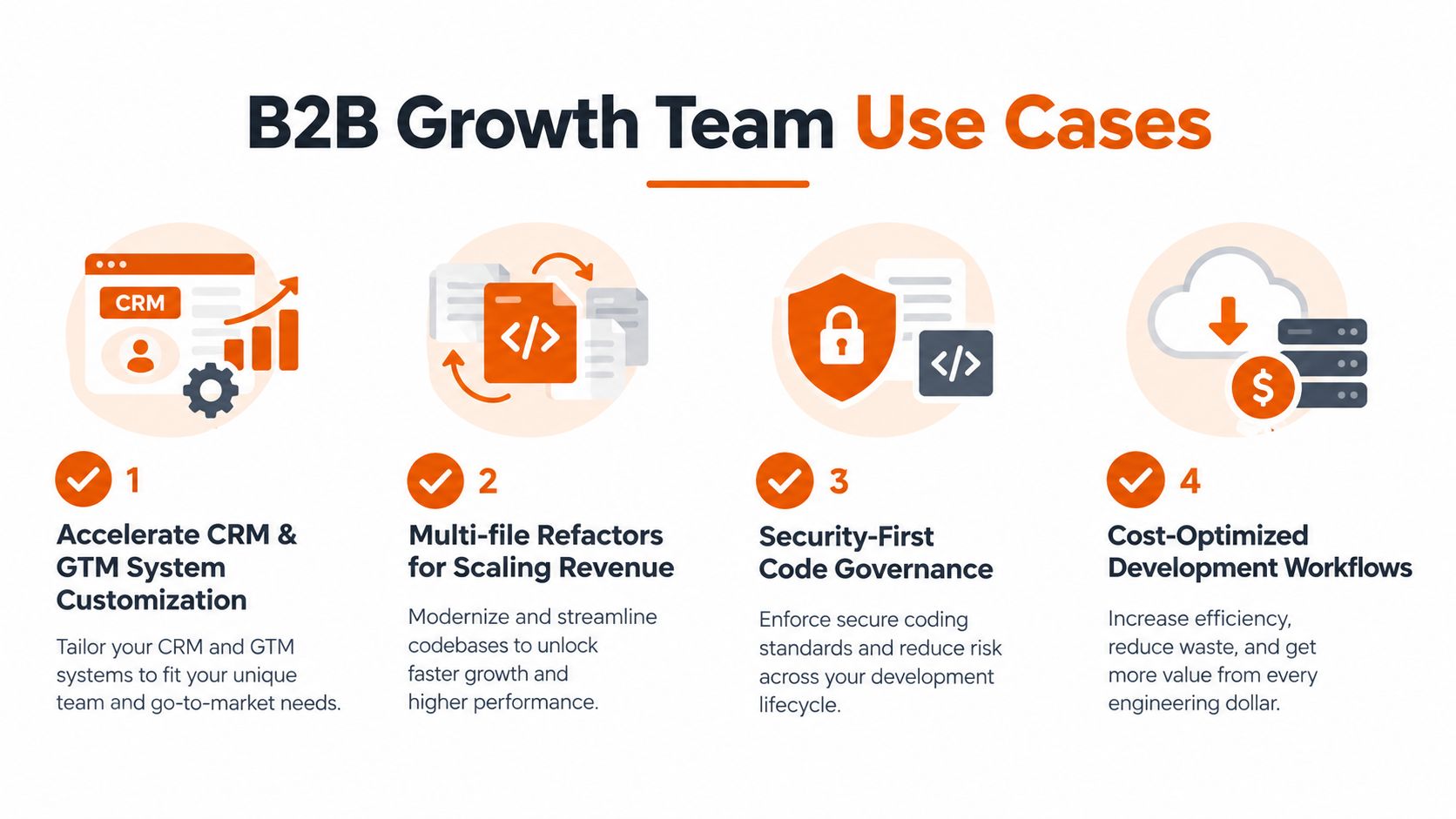
CRM and GTM system customization
A growth operations team may need to adjust a CRM integration, update field mappings, or change how lead data moves between systems. Cursor is a strong fit when a developer needs to inspect the exact integration code, make a targeted change, and review the diff alongside configuration and interface logic.
Claude Code becomes more attractive when the request spans multiple services, tests, documentation, and migration steps. For example, an agent can work through a defined change to lead-routing logic, update related tests, and produce a summary for review.
Prometheus Agency's AI code editor guidance is relevant for leaders comparing editor-based workflows with broader AI development practices. The choice should follow the process the team needs to control.
Revenue operations refactors
Scaling revenue operations often creates repetitive technical work. A shared data structure changes, several integrations need updates, and documentation has to stay aligned. Claude Code can reduce coordination cost when the task has a clear scope and requires sequential actions across the repository.
The reviewer still needs to confirm that the agent changed the right systems and didn't introduce behavior that merely satisfies a narrow test. A clean branch, explicit acceptance criteria, and a required pull request summary should be standard.

Documentation and onboarding
Documentation-heavy work is a natural candidate for Claude Code. The agent can inspect existing modules, identify missing explanations, update related files, and run checks where the repository supports them. This approach can help distributed teams reduce the number of informal explanations that otherwise pass through senior engineers.
Cursor is better when the author is shaping the material while reading the implementation. A developer can move between documentation and source files, make precise edits, and keep editorial judgment close to the change.
Rapid bug-fix sprints
Bug fixes often benefit from a narrow feedback loop. Cursor lets the developer inspect the affected code, ask for a focused patch, review the visual diff, and refine the implementation quickly. That control matters when the fix depends on nuanced product behavior rather than a broad mechanical change.
For a distributed team, the decision should be explicit. Standardize Cursor for interactive fixes, Claude Code for delegated backlog tasks, or choose one tool and accept the trade-off. A hybrid policy can reduce tool conflict if the team defines ownership, review expectations, and escalation rules.
Impact opportunity: Connect tool selection to measurable business work, such as reducing manual CRM maintenance, shortening lead-to-appointment workflows, or keeping GTM integrations reliable as revenue operations expand.
Pricing Security and Enterprise Readiness Compared
Pricing needs to be evaluated against workload shape, not subscription labels.
Recent comparisons place both products in pricing clusters from about $20 to $200 per month, while also noting that Claude Code can consume more tokens on large tasks. The real-workload analysis of Cursor and Claude Code economics makes the central point: the cheaper tool on paper may not be the cheaper tool for the work your team performs.
The reported token comparison is especially useful for planning. On equivalent tasks, one benchmark cited 33K tokens for Claude Code versus 188K tokens for Cursor, a difference that can affect usage cost, context pressure, and capacity planning. That efficiency advantage can disappear when a task is small and visual, or when Cursor's faster inline workflow prevents unnecessary agent activity.

Security is an operating requirement
For a middle-market or manufacturing company, security review should cover more than whether a tool can edit code. Ask how repositories are accessed, how permissions are scoped, how secrets are protected, how changes are logged, and who can approve generated code.
Cursor's visual workflow can make review easier for teams that want developers to inspect each change before applying it. Claude Code's autonomy requires stronger procedural controls because the agent may perform several actions before a human evaluates the result.
A practical governance policy should define:
- Repository access: Which projects and branches can the tool read or modify?
- Credential boundaries: Which commands and environments are prohibited?
- Review ownership: Which human remains accountable for the pull request?
- Evidence requirements: What tests, summaries, and issue references must accompany the change?
- Incident response: How does the team revoke access or revert an agent-generated change?
Leaders evaluating Claude-related spend can also consult this Claude AI pricing overview, but pricing research should sit inside a broader approval and usage framework. Enterprise readiness is not just an administrative feature. It includes adoption, training, auditability, and the ability to explain how AI-generated work moves from request to production.
Recommendation and Pilot Plan for Adoption
Choose Cursor if your team spends most of its time on UI work, focused feature changes, debugging, and edits that benefit from visible diffs. Choose Claude Code if the backlog contains substantial documentation work, multi-file refactors, test scaffolding, migrations, or tasks that can be expressed as clear outcomes.
Choose a hybrid model when both work patterns are material. Assign Cursor to interactive development and Claude Code to delegated execution. Don't let every developer invent a personal process, because inconsistent workflows create review gaps and make adoption difficult to measure.
Run a controlled pilot
Start with a representative slice of work rather than a showcase project.
- Select task categories: Include focused edits, bug fixes, documentation, and a multi-file change.
- Define guardrails: Require clean branches, human review, tests, and documented acceptance criteria.
- Assign accountability: Name the developer responsible for every generated change, regardless of which tool produced it.
- Measure outcomes: Track completion quality, review effort, rework, token consumption, cycle time, and developer friction.
- Set a decision checkpoint: Keep, expand, change, or stop the pilot based on evidence from the team's real backlog.
Migration should begin with workflow rules, not licenses. Train developers to write outcome-based tasks for Claude Code and precise context-rich requests for Cursor. Give reviewers a shared checklist so autonomy doesn't become a reason to lower standards.
Key Takeaways: Cursor is the better default for interactive pair programming. Claude Code is the better fit for autonomous, multi-step execution. The most defensible enterprise decision is the one that matches workload shape, review capacity, security controls, and total cost rather than choosing a universal winner.
Prometheus Agency helps growth leaders evaluate AI coding workflows alongside CRM, GTM, and revenue-system priorities. Visit Prometheus Agency to explore an outcome-focused AI strategy, implementation support, and a practical pilot plan for your organization.